H100 vs A100: GPU Benchmarks, Specs & Cloud Pricing Compared (2026)
The NVIDIA H100 is 2-4x faster than the A100 across training and inference workloads, while the A100 costs 45% less per hour. In our benchmarks on Jarvislabs infrastructure, H100 delivered 2.29x higher throughput on Qwen3-8B and up to 4x on Qwen3-32B with FP8 — but A100 at $1.49/hr remains the better value for fine-tuning and dev work where maximum speed isn't critical.
The A100 vs H100 decision shapes almost every modern AI infrastructure choice — from fine-tuning LLMs to serving production inference. NVIDIA's H100 and A100 GPUs sit at two different points on the performance-to-cost curve, and picking between them depends on the workload rather than the spec sheet alone. In this article we walk through the specifications, real measured benchmarks, and cost-per-job math needed to make an informed A100 vs H100 choice.
Short answer if you're in a hurry: H100 is 2-4x faster than A100 depending on the workload (smallest gap on BF16 inference of medium models, largest gap with FP8 on memory-bound workloads). A100 80GB runs at $1.49/hr on Jarvislabs, H100 80GB at $2.69/hr — so H100 is ~80% more per hour but often cheaper per job because it finishes 2-2.5x faster. Choose H100 for training, FP8 inference, and production serving. Choose A100 for fine-tuning at budget, dev work, and MIG-partitioned multi-tenant serving.
Updated April 2026: The GPU market has shifted significantly since this article was first published. H100 cloud pricing has dropped from $8/hour to $2.69-$2.99/hour, and A100 80GB pricing has settled at $1.49/hour ($1.29 for the 40GB variant) on Jarvislabs. The H100 remains the performance leader, but the A100 has carved out a strong niche as the best-value GPU for teams that don't need maximum speed. For detailed per-GPU pricing, see our H100 Price Guide, A100 Price Guide, and H200 Price Guide.
We've also added L4 GPUs to Jarvislabs — see our L4 vs A100 comparison if you're considering a budget inference GPU.
NVIDIA H100 vs NVIDIA A100 Specs
The specifications reveal the H100's clear technological advantages across all major metrics. With 2.7x more CUDA cores, 3x higher FP32 performance, and 67% greater memory bandwidth, the H100 delivers substantial improvements over the A100. While the H100's higher TDP of 700W requires more robust cooling solutions, its architectural advantages and recent price reductions make it increasingly attractive for enterprise AI deployments. The improved NVLink 4.0 and PCIe Gen5 support also enable better scaling for multi-GPU configurations.
| Feature | NVIDIA H100 | NVIDIA A100 | Impact | |-----------------------|----------------------------------|----------------------------------|----------------------------------------| | CUDA Cores | 18,432 | 6,912 | 2.7x more cores for parallel processing | | Tensor Cores | 4th Gen (Enhanced FP8 support) | 3rd Gen | 6x faster AI training | | Memory | 80GB HBM3 (3.35 TB/s bandwidth) | 80GB HBM2e (2 TB/s bandwidth) | 67% higher memory bandwidth | | Memory Type | HBM3 | HBM2e | Faster memory speed | | Peak FP32 Perf. | 60 TFLOPS | 19.5 TFLOPS | 3x improvement in standard compute | | Architecture | Hopper | Ampere | New features like Transformer Engine | | TDP | 700W | 400W | Requires more robust cooling | | NVLink | 4.0 (900 GB/s) | 3.0 (600 GB/s) | 50% faster multi-GPU scaling | | PCIe Support | PCIe Gen5 | PCIe Gen4 | Higher data transfer rates | | Launch Price (MSRP) | ~$30,000 | ~$15,000 | Higher initial investment | | Cloud Cost/Hour* | $2.69-$2.99 | $1.49 (80GB) / $1.29 (40GB) | More cost-effective over time |
Info: You can launch an H100 SXM at $2.99/hour on jarvislabs.ai. No commitment, ingress/egress included.
Impact of Higher Memory Bandwidth
The H100's 3.35 TB/s memory bandwidth (compared to A100's 2 TB/s) significantly impacts AI workloads in several ways:
Training Benefits
- Faster Weight Updates: Higher bandwidth allows faster reading and writing of model parameters during backpropagation
- Larger Batch Sizes: More data can be processed simultaneously, improving training efficiency
- Reduced Memory Bottlenecks: Less time spent waiting for data transfers between GPU memory and compute units
Inference Advantages
- Lower Latency: Faster data movement enables quicker model predictions
- Higher Throughput: More concurrent inference requests can be handled
- Better Large Model Performance: Critical for serving massive language models where weight loading speed matters
This 67% bandwidth improvement, combined with the H100's Transformer Engine, makes it particularly well-suited for large language models and vision transformers where memory access patterns are intensive.
FP8 vs FP16
The H100's support for FP8 (8-bit floating point) precision marks a significant advancement over the A100, which lacks native FP8 capabilities. This new precision format delivers substantial benefits for AI workloads:
Performance Gains
- 2.2x Higher Token Generation: When using FP8 instead of FP16, especially at larger batch sizes
- 30% Lower Latency: Reduced time-to-first-token during model inference
- 50% Memory Savings: Enables larger batch sizes and more efficient resource utilization
- Native Hardware Support: H100's architecture is specifically designed for FP8 operations, unlike the A100
Quality and Flexibility
FP8 comes in two variants (E4M3 and E5M2) that balance precision and dynamic range. Despite the reduced precision, models maintain comparable quality to higher precision formats like FP16 or BF16. This makes FP8 particularly valuable for:
- Training and serving large language models
- Computer vision tasks
- High-throughput AI inference workloads
For organizations running memory-intensive AI workloads, the H100's FP8 support can translate to significant cost savings through higher throughput and better resource utilization. While the A100 can use quantization techniques to approximate some FP8 benefits, it cannot match the H100's native FP8 performance. For a deeper look at quantization methods and their performance trade-offs, see our complete guide to LLM quantization with vLLM.
FlashAttention-2: Supercharging Large Models
FlashAttention-2 brings significant performance improvements to both H100 and A100, though the H100's architecture is particularly well-optimized for it. This attention mechanism optimization makes handling large language models and long sequences more efficient:
Performance Benefits
- 3x Faster than the original FlashAttention
- Up to 10x Faster than standard PyTorch implementations
- 225 TFLOPs/s achievable on A100, with even higher speeds on H100
- Drastically Reduced Memory Usage through block-wise computation
H100-Specific Advantages
The H100's architecture is particularly well-suited for FlashAttention-2, offering better throughput for matrix operations and improved low-latency memory access patterns. Combined with its FP8 support, this enables more efficient processing of longer sequences and larger batch sizes than the A100.
Memory Optimization
FlashAttention-2 uses clever techniques like tiling and online softmax calculations to minimize data transfers between GPU memory and compute units. This optimization is especially powerful on H100's higher-bandwidth memory system, allowing for processing of longer sequences without running into memory bottlenecks.
Industry Benchmarks
In a recent collaboration between Databricks and CoreWeave, the performance of NVIDIA's H100 GPUs was benchmarked against the previous generation A100 GPUs, revealing significant advancements in both speed and cost-efficiency for large language model (LLM) training.
Performance Improvements
The H100 GPUs demonstrated substantial enhancements over the A100s:
-
Training Speed: H100 GPUs achieved up to 3 times faster training times compared to A100 GPUs.
-
Cost Efficiency: With recent cloud pricing drops (H100 costs now only ~30-40% more per hour than A100), the H100's 2-3x higher throughput results in approximately 40-60% lower cost per unit of work.
Technical Enhancements
Several architectural improvements contribute to the H100's superior performance:
-
Increased FLOPS: The H100 offers 3 to 6 times more total floating-point operations per second (FLOPS) than the A100, significantly boosting computational capacity.
-
FP8 Precision Support: The introduction of FP8 data types allows for faster computations without compromising model accuracy, a feature not available in A100 GPUs.
-
Transformer Engine Integration: NVIDIA's Transformer Engine optimizes transformer-based models, enhancing performance in natural language processing tasks.
Real-World Application
In practical scenarios, these advancements enable more efficient training of large-scale models, reducing both time and cost. For instance, training a 1.3 billion parameter GPT model on H100 GPUs required no changes to hyperparameters and converged faster than on A100 GPUs.
These findings underscore the H100's capabilities in accelerating AI workloads, making it a compelling choice for organizations aiming to optimize performance and cost in large-scale AI model training.
V100 vs A100 vs H100 vs H200: Multi-Generation Comparison
To put the H100 vs A100 comparison in broader context, here's how NVIDIA's datacenter GPU lineup has evolved across four generations — from the V100 (Volta) through the latest H200 (Hopper):
| Feature | V100 (Volta) | A100 (Ampere) | H100 (Hopper) | H200 (Hopper) |
|---|---|---|---|---|
| Launch Year | 2017 | 2020 | 2022 | 2024 |
| Process Node | 12nm | 7nm | 4nm | 4nm |
| CUDA Cores | 5,120 | 6,912 | 18,432 | 18,432 |
| Tensor Cores | 1st Gen (640) | 3rd Gen (432) | 4th Gen (528) | 4th Gen (528) |
| Memory | 32GB HBM2 | 80GB HBM2e | 80GB HBM3 | 141GB HBM3e |
| Bandwidth | 900 GB/s | 2.0 TB/s | 3.35 TB/s | 4.8 TB/s |
| FP32 TFLOPS | 15.7 | 19.5 | 60 | 60 |
| FP16 Tensor | 125 TFLOPS | 312 TFLOPS | 989 TFLOPS | 989 TFLOPS |
| FP8 Support | No | No | Yes | Yes |
| Transformer Engine | No | No | Yes | Yes |
| NVLink | 2.0 (300 GB/s) | 3.0 (600 GB/s) | 4.0 (900 GB/s) | 4.0 (900 GB/s) |
| TDP | 300W | 400W | 700W | 700W |
| MSRP | ~$10,000 | ~$15,000 | ~$30,000 | ~$30,000+ |
Key generational leaps:
- V100 → A100: 2.2x memory capacity, 2.2x bandwidth, Multi-Instance GPU (MIG), 3rd Gen Tensor Cores
- A100 → H100: 2.7x CUDA cores, 67% more bandwidth, native FP8, Transformer Engine, 3x faster training
- H100 → H200: Same compute, 76% more memory, 43% more bandwidth — a memory-focused upgrade
The V100 is largely end-of-life for new deployments but still appears in many on-premises clusters. If you're migrating from V100, the A100 offers 2-3x the performance at similar cloud pricing, making it the natural upgrade path for budget-conscious teams.
Info: For the latest B200 (Blackwell architecture), NVIDIA claims up to 2.5x training performance over H100. B200 cloud instances are beginning to appear from select providers in 2026.
Real-World Benchmarks: H100 vs A100 on Jarvislabs
We ran identical benchmarks on Jarvislabs GPU instances to measure real-world performance differences. Here are the results from our H100 SXM (80GB HBM3) instance:
Matrix Multiplication (8192×8192)
| Precision | A100 80GB (Reference) | H100 80GB (Measured) | H100 Speedup |
|---|---|---|---|
| FP32 | ~19.5 TFLOPS | 51.9 TFLOPS | 2.7x |
| FP16 | ~312 TFLOPS | 757.9 TFLOPS | 2.4x |
| BF16 | ~312 TFLOPS | 790.7 TFLOPS | 2.5x |
Memory Bandwidth
| Metric | A100 80GB (Spec) | H100 80GB (Measured) |
|---|---|---|
| Bandwidth | 2.0 TB/s | 2.63 TB/s |
Transformer Training Throughput
We benchmarked a PyTorch Transformer Encoder (6-layer, d_model=1024, 16 heads) — a representative workload for modern AI training:
| Precision | Metric | A100 80GB (Reference) | H100 80GB (Measured) | H100 Speedup |
|---|---|---|---|---|
| FP32 | Samples/sec | ~60 | 164.4 | 2.7x |
| FP16 (AMP) | Samples/sec | ~350 | 882.4 | 2.5x |
| FP16 (AMP) | Tokens/sec | ~179,000 | 451,769 | 2.5x |
For a larger model (12-layer, d_model=2048, 32 heads, seq_len=1024):
| Precision | Metric | H100 80GB (Measured) |
|---|---|---|
| FP16 (AMP) | Samples/sec | 98.9 |
| FP16 (AMP) | Tokens/sec | 101,265 |
Takeaway: The H100 consistently delivers 2.4-2.7x the raw compute throughput of an A100 across all precision levels. The gap widens further with Transformer Engine and FP8 optimizations in production inference frameworks like vLLM and TensorRT-LLM.
Tip: You can reproduce these A100 vs H100 benchmarks on Jarvislabs.ai. Launch an H100 at $2.69/hr (IN2) or $2.99/hr (EU1), and an A100 80GB at $1.49/hr.
LLM Inference Performance: H100 vs A100
We benchmarked A100 vs H100 inference directly on Jarvislabs infrastructure using Qwen3-8B (compute-bound) and Qwen3-32B (memory-bound) — two model sizes that bracket most production LLM workloads.
For the runs below, we used the latest stable vLLM build on Jarvislabs A100 80GB SXM ($1.49/hr) and H100 80GB SXM ($2.69/hr), fed each GPU 500 ShareGPT prompts — chosen over synthetic benchmarks so prefill and decode both get exercised by realistic variable-length conversational traffic — and fixed the random seed to 42 so anyone can reproduce the numbers end-to-end. Online serving tests held 16 requests in flight concurrently; offline runs processed the same 500-prompt dataset with no concurrency throttle.
Qwen3-8B Offline Throughput
The 8B model's 16 GB weight footprint leaves roughly 60 GB of headroom on both 80 GB GPUs — enough slack that vLLM fills its request queue before either card starts thrashing HBM. In that regime CUDA throughput sets the ceiling, and what you actually measure is the raw TFLOPS gap between the two architectures.
| GPU | BF16 (tok/s) | FP8 (tok/s) | Speedup vs A100 |
|---|---|---|---|
| A100 80GB | 3,071 | N/A (no FP8) | 1.0x baseline |
| H100 80GB | 7,024 | 7,825 | 2.29x → 2.55x with FP8 |
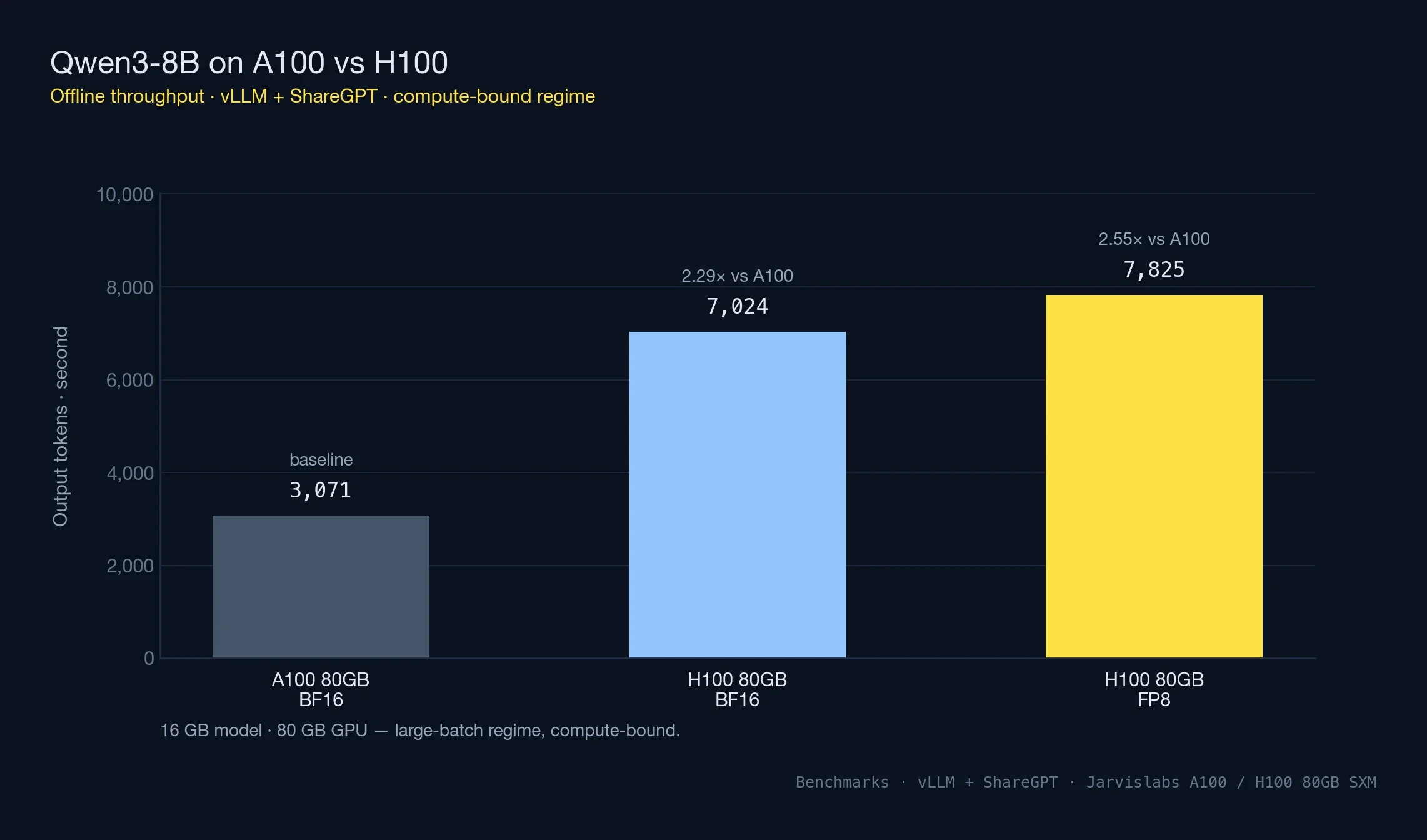
H100 delivers 2.29x the throughput of A100 in BF16 — close to the theoretical compute ratio. FP8 adds an incremental 11% on top, which is modest because the workload isn't memory-constrained to begin with.
Qwen3-8B Online Serving Latency
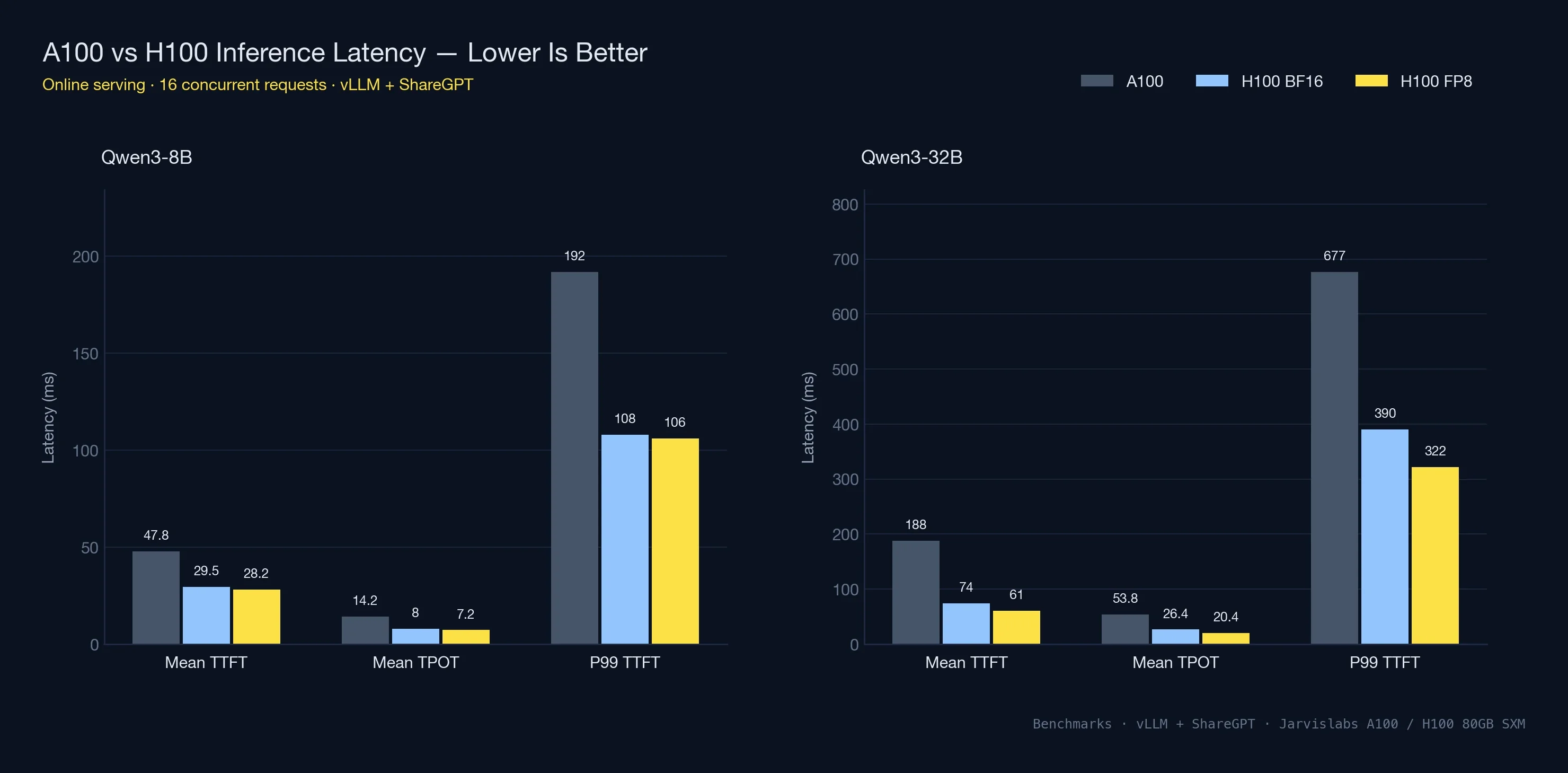
Under concurrent load (16 simultaneous requests), the latency numbers matter more than raw throughput. This is what users actually experience for chat and interactive applications.
| Metric | A100 80GB | H100 80GB | H100 FP8 |
|---|---|---|---|
| Output tok/s | 1,074 | 1,896 | 2,109 |
| Mean TTFT | 47.8 ms | 29.5 ms | 28.2 ms |
| Mean TPOT | 14.2 ms | 8.0 ms | 7.2 ms |
| P99 TTFT | 192 ms | 108 ms | 106 ms |
H100 cuts time-to-first-token from 48 ms to 30 ms — a 1.6x improvement on the metric users feel most. Time-per-output-token (how fast tokens stream after the first one) nearly halves. P99 TTFT, the worst-case first-token latency that 1% of users see, drops from 192 ms to 108 ms. That's the difference between a responsive chatbot and a noticeably slow one.
Qwen3-32B: Where Memory Bandwidth Kicks In
At 32B parameters (~64 GB in BF16), the model leaves only ~16 GB on an 80GB GPU for KV cache and batching. Memory, not compute, becomes the bottleneck — and the A100 vs H100 comparison shifts shape accordingly.
| GPU | BF16 (tok/s) | FP8 (tok/s) | Speedup vs A100 | FP8 Boost |
|---|---|---|---|---|
| A100 80GB | 699 | N/A | 1.0x baseline | N/A |
| H100 80GB | 1,251 | 2,795 | 1.79x → 4.0x with FP8 | 2.23x |
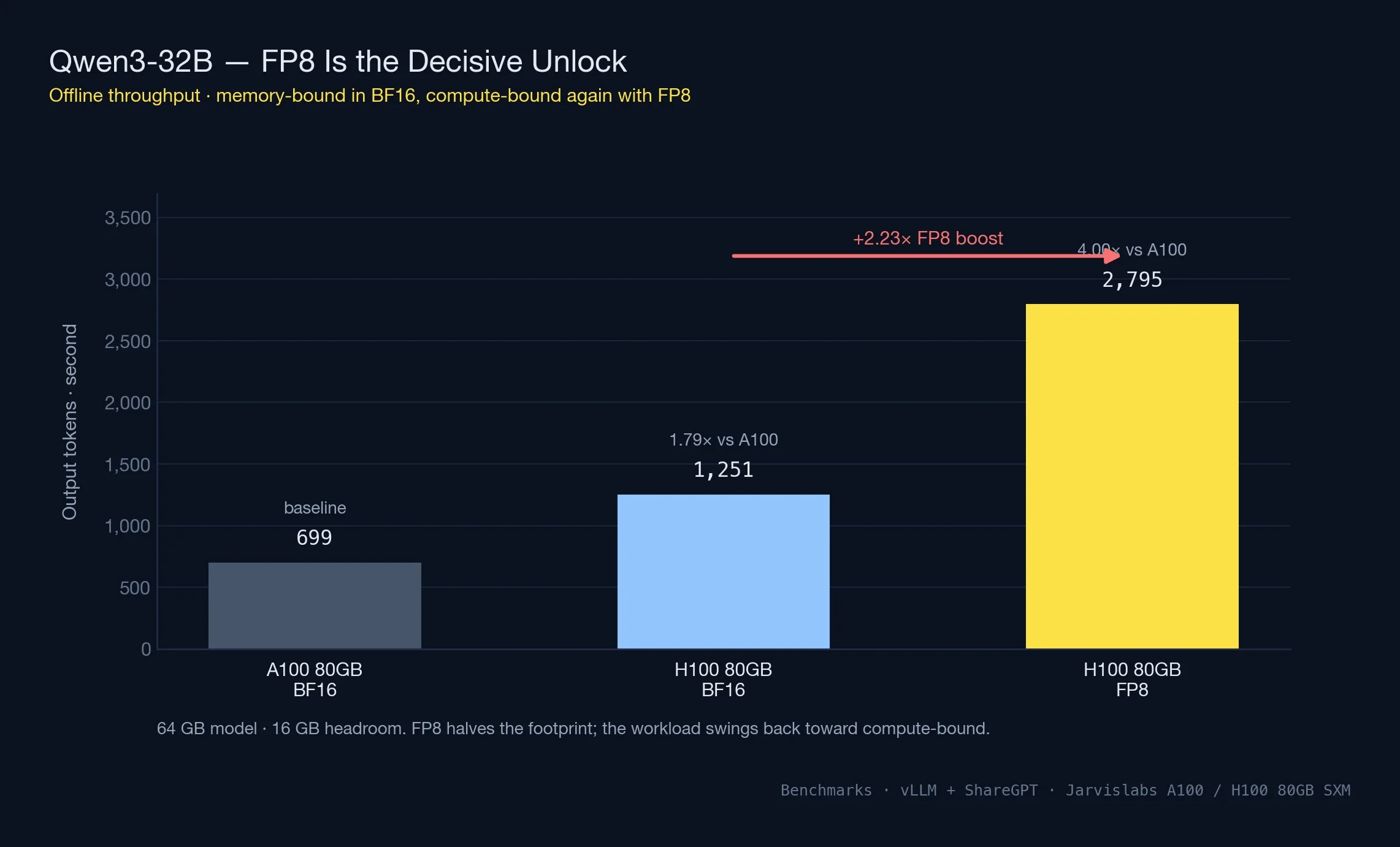
On a 32B model in BF16 the H100 spends 64 of its 80 GB just holding weights, leaving vLLM roughly 16 GB to work with for KV cache and in-flight batches. That pinch is exactly why H100's speedup drops from 2.29x (on the spacious 8B run) to 1.79x here — memory bandwidth, not CUDA throughput, is the bottleneck.
FP8 rewrites the arithmetic. The weight footprint collapses to around 32 GB, which roughly triples the working memory available for concurrent requests. At the same time, every forward pass only has to move half as many bytes through HBM because each weight is now one byte instead of two. Those two effects compound, which is why the FP8 lift on 32B (2.23x) dwarfs the 11% lift on 8B. A100 can't follow the same path — Ampere has no native FP8 silicon, and falling back to INT8 has different quality tradeoffs most production stacks aren't willing to take.
Qwen3-32B Online Latency
| Metric | A100 80GB | H100 80GB | H100 FP8 |
|---|---|---|---|
| Output tok/s | 283 | 576 | 749 |
| Mean TTFT | 188 ms | 74 ms | 61 ms |
| Mean TPOT | 53.8 ms | 26.4 ms | 20.4 ms |
| P99 TTFT | 677 ms | 390 ms | 322 ms |
The 32B latency picture tracks the throughput one: every metric roughly halves. TPOT moves from 54 ms to the low 20s once FP8 is on, and P99 TTFT — the long-tail number that quietly drives user churn on AI products — collapses from 677 ms to 322 ms. In product terms that's the gap between a chatbot that feels instant and one where every fourth response visibly drags.
Tip: You can reproduce these A100 vs H100 benchmarks on Jarvislabs at $1.49/hr (A100 80GB) and $2.69/hr (H100 80GB IN2). Per-minute billing means you only pay for the time the benchmark actually runs.
Compute-Bound vs Memory-Bound: When the A100 vs H100 Gap Shifts
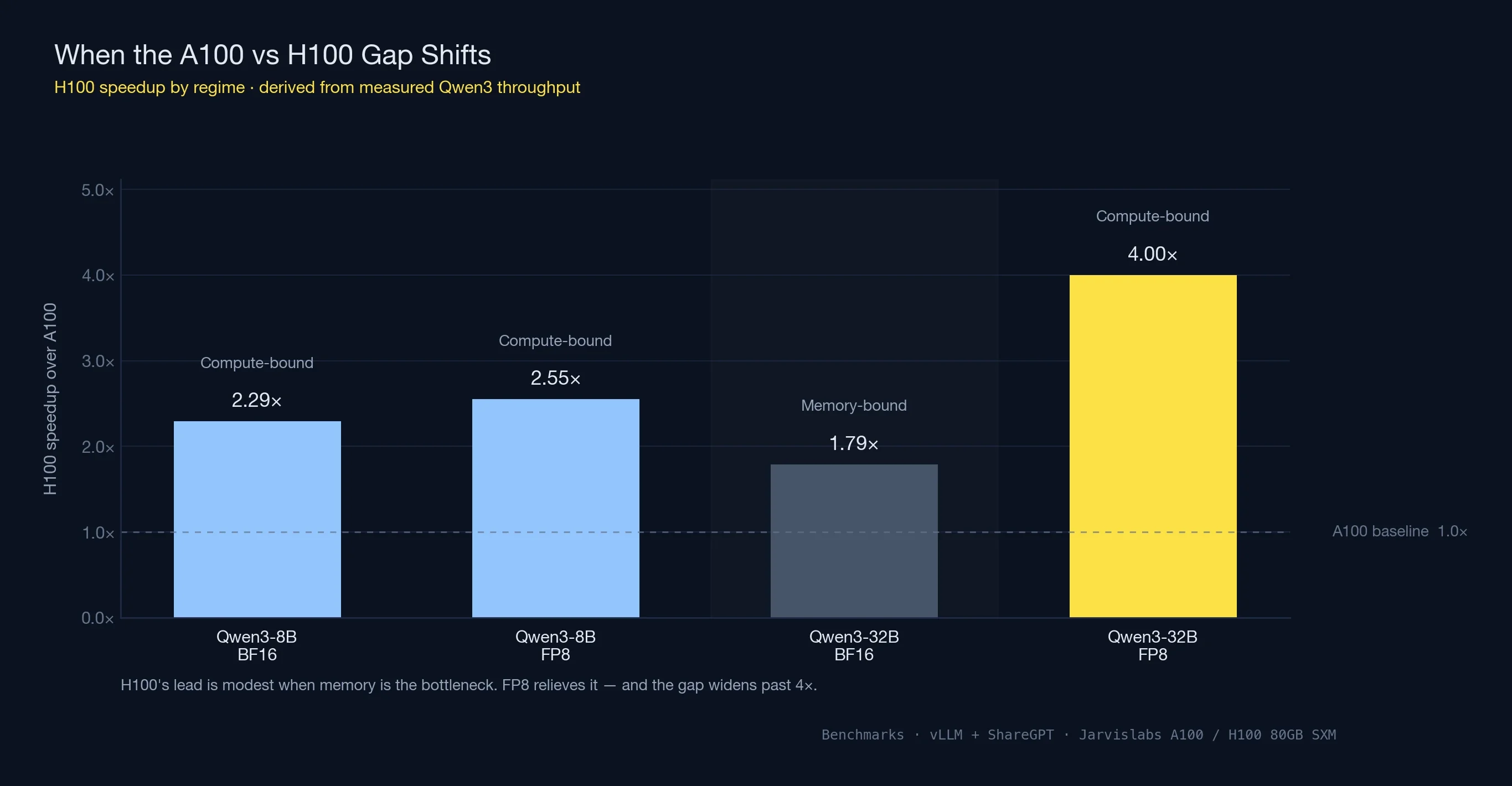
Notice how the speedup ratio changed across the two Qwen3 models: H100 was 2.29x faster on 8B, slowed to 1.79x on 32B BF16, then jumped to roughly 4x once FP8 was enabled. The pattern is a well-understood shift in what's limiting GPU performance.
Every GPU inference workload falls somewhere on a spectrum between two regimes:
- Compute-bound workloads — the GPU has enough memory bandwidth to keep its CUDA cores fed. Raw TFLOPS determine the ceiling. Small models with large batches usually land here, because the same weights get reused across many requests inside one forward pass.
- Memory-bound workloads — the CUDA cores sit partly idle waiting for weights to stream in from HBM. Memory bandwidth determines the ceiling. Large models with tight memory headroom land here, because there's no room to amortize the weight-transfer cost across many batched requests.
For Qwen3-8B, both A100 and H100 had plenty of memory headroom, so vLLM batched aggressively and the GPUs stayed compute-bound. H100's ~3x compute advantage over A100 showed up as a ~2.3x throughput lift.
For Qwen3-32B in BF16, memory headroom shrank to 16 GB and the workload slid into memory-bound territory. H100's 67% bandwidth advantage over A100 (3.35 TB/s vs 2.0 TB/s) now dominates — and that 67% roughly matches the 1.79x throughput lift we measured.
Switch H100 to FP8 and three things happen at once:
- The model footprint halves, freeing room for larger batches
- Memory traffic drops by half per forward pass — one byte per weight instead of two
- The workload slides back toward compute-bound as batches grow, letting H100's FP8 Tensor Cores hit their peak
The result: throughput on 32B jumps from 1,251 to 2,795 tok/s, and the A100 vs H100 gap stretches from ~1.8x to ~4x. A100 has no equivalent path — Ampere lacks native FP8 hardware, and the closest substitute is INT8 with different quality tradeoffs.
The takeaway for any A100 vs H100 decision: the speedup isn't a single fixed number. Expect around 2x when both GPUs have memory to spare, narrower in BF16 once memory gets tight, and 3-4x once FP8 enters the picture.
When the More Expensive GPU Is Actually Cheaper
Hourly rate is a billing number, not a decision number. What matters is what you pay to finish the job — and at that level the A100 vs H100 decision frequently flips.
Work a specific example, plugging in the speedup we actually measured on Qwen3-8B (2.29x). Say a fine-tune takes 36 hours on an A100 80GB — at Jarvislabs' $1.49/hr, $53.64. If the same workload runs at the measured 2.29x ratio, it lands in roughly 16 hours on an H100 at $2.69/hr — $43.04. The faster GPU costs 80% more per hour but ~20% less overall, because it stops the clock sooner.
| GPU | Job time | $/hr | Total |
|---|---|---|---|
| A100 80GB | 36 hrs | $1.49 | $53.64 |
| H100 80GB | ~16 hrs (at measured 2.29x) | $2.69 | $43.04 |
The savings scale with how close the workload runs to the measured speedup. Workloads that can take advantage of FP8 land closer to the 4x speedup we measured on Qwen3-32B — which pushes H100 further ahead on both time and total cost. The per-token math on inference is the same story: an H100 producing 2-3x more tokens per second than an A100 comes in at a lower cost per million tokens served, despite the higher hourly bill.
Two cases where A100 still wins on total cost:
- The GPU sits partly idle. Data preprocessing with occasional bursts, dev iteration where the card waits on a human between runs, batch sizes too small to keep the full H100 pipeline busy. A 30%-utilized H100 gives you A100-class throughput at H100 prices.
- There's no FP8 path in the stack. The H100 advantage compresses to 1.8-2x under BF16-only workloads — closer to parity. At that point the 80% hourly premium gets harder to justify.
For fine-tuning, training, and high-throughput inference, the A100 vs H100 math favours H100 more often than the spec sheet suggests. For experimentation, dev boxes, and lightly-used inference, A100 is still the value pick.
Quick rule: Price out the whole job end-to-end before you pick — hourly rate is a billing number, not a decision number. If the workload can be measured on both GPUs, measure it once; the math tends to surprise people.
Multi-Instance GPU (MIG): An Underrated A100 vs H100 Angle
One A100 vs H100 comparison point that often gets overlooked: Multi-Instance GPU partitioning. Both GPUs support MIG — carving a single physical GPU into up to 7 isolated instances, each with dedicated VRAM, compute, and memory bandwidth.
For single-model production serving MIG doesn't matter — you want the full GPU. But for two specific scenarios it's a real differentiator:
- Multi-tenant inference — serve 7 different customers or models on one physical GPU with hardware-level isolation between them
- Cost-efficient dev environments — hand each engineer a 10 GB or 20 GB slice instead of a full GPU per person
MIG profiles range from 1g.10gb (the smallest slice) up to 7g.80gb (the full GPU, no partitioning). The A100 was the first datacenter GPU to ship with MIG and is still widely used for shared inference infrastructure on that basis. H100 carries the capability forward with second-generation MIG, which offers better isolation between instances.
If your use case needs partitioning, MIG-first workloads sometimes justify staying on A100 simply because the per-slice cost is lower. Four engineers each running experiments on a 20 GB A100 slice is cheaper than giving them four full L4 or A10 GPUs.
DGX H100 vs DGX A100
For teams considering full DGX systems rather than individual cloud GPUs, here's how the two flagship platforms compare:
| Feature | DGX A100 | DGX H100 |
|---|---|---|
| GPUs | 8× A100 80GB | 8× H100 80GB |
| Total GPU Memory | 640 GB | 640 GB |
| GPU-to-GPU Interconnect | NVLink 3.0 (600 GB/s/GPU) | NVLink 4.0 (900 GB/s/GPU) |
| NVSwitch | 1st Gen | 3rd Gen |
| Total NVLink Bandwidth | 4.8 TB/s | 7.2 TB/s |
| Aggregate FP16 Tensor | ~2,500 TFLOPS | ~8,000 TFLOPS |
| CPU | 2× AMD EPYC 7742 | 2× Intel Xeon 8480C |
| System RAM | 2 TB | 2 TB |
| Storage | 30 TB NVMe | 30 TB NVMe |
| Networking | 8× 200Gb InfiniBand | 8× 400Gb InfiniBand |
| System Power | 6.5 kW | 10.2 kW |
| List Price | ~$200,000 | ~$300,000+ |
When DGX makes sense: If you need 8 GPUs with maximum interconnect bandwidth for training large models (70B+ parameters) or need a self-contained AI appliance. The DGX H100's 3rd Gen NVSwitch provides all-to-all GPU communication at 900 GB/s per GPU, critical for tensor parallelism across 8 GPUs.
When cloud is better: For most teams, renting 8× H100 GPUs on Jarvislabs ($23.92/hr for 8× H100 in EU1) is more cost-effective than the $300,000+ DGX H100 purchase price — unless you're running GPUs 24/7 for over a year.
Multi-GPU Scaling: NVLink and InfiniBand
When your model or workload exceeds what a single GPU can handle, inter-GPU communication becomes the bottleneck. Here's how the A100 and H100 compare for multi-GPU training:
NVLink: Intra-Node Communication
| Feature | A100 (NVLink 3.0) | H100 (NVLink 4.0) |
|---|---|---|
| Bandwidth per GPU | 600 GB/s | 900 GB/s |
| Links per GPU | 12 | 18 |
| Supported Topologies | NVSwitch (up to 8 GPUs) | NVSwitch (up to 8 GPUs) |
NVLink is used for tensor parallelism and pipeline parallelism within a single node. The H100's 50% bandwidth improvement reduces the communication overhead when splitting a large model across multiple GPUs.
InfiniBand: Inter-Node Communication
| Feature | A100 Systems | H100 Systems |
|---|---|---|
| Standard | HDR (200 Gb/s) | NDR (400 Gb/s) |
| Per-Node Bandwidth | 8× 200 Gb/s = 1.6 Tb/s | 8× 400 Gb/s = 3.2 Tb/s |
| SHARP In-Network Computing | v2 | v3 |
InfiniBand is used for data parallelism across multiple nodes. The H100's support for NDR InfiniBand at 400 Gb/s (2x faster than A100's HDR) significantly reduces gradient synchronization time in distributed training.
Practical Impact on Training Time
For a 70B parameter model trained across 64 GPUs (8 nodes):
| Configuration | A100 (8 nodes × 8 GPUs) | H100 (8 nodes × 8 GPUs) |
|---|---|---|
| Communication overhead | ~25-30% of total time | ~15-20% of total time |
| Effective compute utilization | ~70-75% | ~80-85% |
| Relative training time | Baseline (1.0x) | ~0.35x (2.8x faster) |
The H100's advantage grows with scale: at 8 GPUs, the speedup is ~2.5x; at 64 GPUs, it reaches ~2.8x due to the faster NVLink and InfiniBand reducing communication bottlenecks.
Cloud Pricing Comparison (April 2026)
Here's how H100 and A100 cloud pricing compares across major providers. We include on-demand pricing — reserved instances are typically 30-50% cheaper.
| Provider | A100 80GB $/hr | H100 80GB $/hr | H100 Premium |
|---|---|---|---|
| Jarvislabs | $1.49 (80GB) / $1.29 (40GB) | $2.69 (IN2) / $2.99 (EU1) | 1.8-2x |
| Lambda | $1.75 | $2.99 | 1.7x |
| CoreWeave | $2.06 | $4.76 | 2.3x |
| AWS (p4d/p5) | $19.22 (8-GPU) | $40.97 (8-GPU) | 2.1x |
| GCP | $3.67 | $11.54 | 3.1x |
Cost per TFLOP-hour (considering 2.5x H100 speedup):
| Provider | A100 $/effective-TFLOP | H100 $/effective-TFLOP | Better Value |
|---|---|---|---|
| Jarvislabs | $1.49 | $1.08-$1.20 | H100 |
| Lambda | $1.75 | $1.20 | H100 |
| CoreWeave | $2.06 | $1.90 | H100 |
At Jarvislabs pricing, the H100 is both faster and cheaper per unit of work — making it the clear winner for production workloads. The A100 remains the better choice only when you need the lowest absolute hourly rate for development, experimentation, or workloads that don't fully utilize GPU compute (e.g., data preprocessing with occasional GPU bursts).
Conclusion
The H100 remains the performance leader in enterprise AI acceleration. However, the A100 has found new life as the best-value GPU in 2026, now that cloud pricing has settled at $1.49/hour for the 80GB variant and $1.29/hour for the 40GB:
- When to choose H100: Training speed is critical, you need FP8 native support, or you're serving high-throughput production inference. The H100's 2-3x performance advantage justifies the higher cost when time matters.
- When to choose A100: Budget is the priority, you're fine-tuning with LoRA/QLoRA, running inference at moderate scale, or experimenting. The A100 is 40-60% cheaper per hour and delivers excellent performance for most workloads.
- When to choose L4: Your model fits in 24GB and you only need inference. The L4 is 3-5x cheaper than A100 with native FP8 support. See our L4 vs A100 comparison.
GPU Decision Matrix (2026)
| Workload | Recommended | Price/hr (Jarvislabs) |
|---|---|---|
| Serving 7B-13B models | L4 | $0.44/hr |
| Fine-tuning up to 70B | A100 80GB | $1.49/hr |
| Serving 70B+ models | H200 141GB | $3.80/hr |
| High-throughput production | H100 | $2.69/hr |
| Maximum VRAM (141GB) | H200 | $3.80/hr |
For detailed pricing, see our A100 Price Guide, H100 Price Guide, and H200 Price Guide.
Frequently Asked Questions (FAQ)
Is A100 more powerful than H100?
No — the H100 is significantly more powerful than the A100. Across our measured benchmarks, H100 delivered 2.29x the throughput of A100 on Qwen3-8B and up to 4x on Qwen3-32B with FP8 quantization. H100 has 2.7x more CUDA cores (18,432 vs 6,912), 67% higher memory bandwidth (3.35 TB/s HBM3 vs 2.0 TB/s HBM2e), and native FP8 hardware that A100 lacks. The A100 is still a capable GPU at its price point — it just isn't more powerful than the H100 on any benchmark.
Is the NVIDIA A100 still relevant in 2026?
Yes — the A100 remains highly relevant for workloads where maximum speed isn't the priority. At $1.49/hr (80GB) on Jarvislabs, the A100 is ~45% cheaper per hour than the H100 and delivers excellent performance for LoRA/QLoRA fine-tuning, inference at moderate scale, dev work, and MIG-partitioned multi-tenant serving. The A100 is not end-of-life; it's positioned as the value GPU in the NVIDIA datacenter lineup now that H100 carries the performance crown.
Is the NVIDIA H100 end of life?
The H100 NVL variant began its EOL phase in Q3 2025, but the H100 SXM (the configuration used in most cloud deployments, including Jarvislabs) remains the workhorse datacenter GPU for 2026. NVIDIA's newer B200 (Blackwell) is beginning to roll out, but the H100 is expected to remain broadly available and supported for the foreseeable future given how much of the AI industry depends on it.
How much faster is H100 than A100 for training?
H100 is 2-2.5x faster than A100 on typical training workloads, rising to 3-4x for transformer models where the Transformer Engine and FP8 can both be used. NVIDIA reports up to 4x speedup on GPT-3 class models. In practical terms, a 100-hour training job on A100 usually completes in 40-50 hours on H100 — which is why H100 often costs less per job despite costing more per hour.
Is A100 or H100 better for fine-tuning LLaMA?
For LoRA or QLoRA fine-tuning of LLaMA models up to 70B parameters, both GPUs work, but the choice depends on budget vs time. A100 80GB at $1.49/hr is the value pick when fine-tuning runs can go overnight. H100 at $2.69/hr finishes the same job in 40-50% of the time and often costs less total — especially if the fine-tuning pipeline can leverage FP8. For full-parameter training (not LoRA), H100 is strongly preferred.
Is upgrading to the NVIDIA H100 worth the investment over the A100?
If your workloads involve large-scale AI models requiring high memory bandwidth and faster training times, the H100 offers significant performance gains that can justify the investment. The recent price reductions for cloud instances make the H100 even more accessible.
Can I use the NVIDIA H100 with my existing infrastructure designed for the A100?
The H100 may require updates to your infrastructure due to its higher power consumption (700W TDP) and cooling requirements. Ensure that your servers and data centers can accommodate the increased power and thermal demands.
How does the FP8 precision in the H100 benefit AI workloads?
FP8 precision allows for faster computations and reduced memory usage without significantly compromising model accuracy. This leads to higher throughput, lower latency, and the ability to handle larger models or batch sizes, particularly beneficial for training and serving large language models.
What are the key architectural differences between the H100 and A100?
The H100 is based on the newer Hopper architecture, featuring 4th Gen Tensor Cores with FP8 support, higher memory bandwidth with HBM3, and PCIe Gen5 support. The A100 is based on the Ampere architecture with 3rd Gen Tensor Cores and HBM2e memory.
How do the H100 and A100 compare in terms of energy efficiency?
While the H100 offers higher performance, it also consumes more power (700W TDP vs. 400W TDP for the A100). This means higher operational costs for power and cooling, which should be considered when calculating the total cost of ownership.
Can the A100 emulate FP8 precision through software?
The A100 does not have native FP8 support, but it can use quantization techniques to approximate some benefits of lower precision. However, it cannot match the H100's performance and efficiency with FP8 operations.
What is the significance of NVLink 4.0 in the H100?
NVLink 4.0 provides faster interconnect bandwidth (900 GB/s) compared to NVLink 3.0 in the A100 (600 GB/s). This allows for better scaling in multi-GPU setups, reducing communication bottlenecks and improving performance in distributed workloads.
How does the higher memory bandwidth of the H100 impact AI training and inference?
The H100's 3.35 TB/s memory bandwidth enables faster data movement between memory and compute units. This reduces memory bottlenecks, allows for larger batch sizes, and improves overall training and inference speeds, especially in memory-intensive tasks.
Are there any software or compatibility considerations when switching from A100 to H100?
Most AI frameworks and software libraries support both GPUs, but to fully leverage the H100's capabilities (like FP8 precision and Transformer Engine optimizations), you may need to update your software stack to the latest versions that include these features.
What are the cooling requirements for the NVIDIA H100?
Due to its higher TDP of 700W, the H100 requires more robust cooling solutions, such as advanced air cooling or liquid cooling systems. Ensuring adequate cooling is essential to maintain performance and prevent thermal throttling.
How does the H100's Transformer Engine enhance AI model performance?
The Transformer Engine in the H100 optimizes transformer-based models by intelligently managing precision (FP8 and FP16) to accelerate training and inference while maintaining model accuracy. This results in significant performance gains for NLP and other transformer-heavy workloads.
Is cloud deployment or on-premises installation better for using the H100?
Cloud deployment offers flexibility and scalability without the upfront investment in hardware and infrastructure upgrades. On-premises installation provides control over your environment but requires significant capital expenditure for the GPUs and supporting infrastructure.
What is the expected availability of the A100 and H100 in the market?
The H100 is becoming increasingly available due to improved production and competition among providers, while the A100's availability may be limited as the industry shifts focus to the newer H100 and upcoming GPU releases.
How do the H100 and A100 perform in non-AI workloads like high-performance computing (HPC)?
Both GPUs are capable in HPC tasks, but the H100's advanced features and higher computational power make it better suited for demanding HPC applications that can leverage its enhanced capabilities.
What should I consider when planning for future GPU upgrades beyond the H100?
Stay informed about NVIDIA's roadmap and upcoming GPU releases. NVIDIA's B200 (Blackwell architecture) is now available, offering up to 2.5x the training performance of H100. Consider the scalability of your infrastructure and the ease of integrating newer technologies to future-proof your investments.
References
- NVIDIA H100 Datasheet
- NVIDIA A100 Datasheet
- NVIDIA H200 Datasheet
- NVIDIA DGX H100 System
- Databricks and CoreWeave H100 Benchmarks
- MLCommons Benchmarks
- vLLM: Easy, Fast, and Cheap LLM Serving
- Jarvislabs GPU Cloud Pricing
Related Technical Articles
- Speculative Decoding in vLLM: Complete Guide to Faster LLM Inference
- Scaling LLM Inference: Data, Pipeline & Tensor Parallelism in vLLM
- Disaggregated Prefill-Decode: The Architecture Behind Meta's LLM Serving
- Expert Parallelism and Mixed Parallelism Strategies in vLLM
- vLLM Optimization Techniques: 5 Practical Methods to Improve Performance
- The Complete Guide to LLM Quantization with vLLM
Get Started
Build & Deploy Your AI in Minutes
Cloud GPU infrastructure designed specifically for AI development. Start training and deploying models today.
View Pricing