Own your inference: the best coding model for one RTX PRO 6000

Jarvislabs
When you build a product on top of an AI model, you usually don't own that model. You're renting it through someone else's API, which means the provider can raise the price, change the terms, or cut you off whenever it wants. One good example is the export control that hit Anthropic's two newest models, Fable 5 and Mythos 5, which forced the company to take them completely offline, and even paying customers lost access overnight. But getting shut off completely is only the loud version of the problem. More often it's quieter: the model you built and tested against gets retired and replaced, your rate limits get cut, or the rules around your data change, all on the vendor's timeline and not yours. If your product depends on a model you rent, someone else gets to decide whether it keeps working.
You probably don't need a frontier model anyway
Most companies don't need the biggest, most expensive model for the work they actually do. Plenty of real work runs perfectly well on a mid-size model: summarizing long documents, pulling structured data out of messy files, sorting and routing support tickets, answering questions over an internal wiki. Using a frontier model for those jobs just means paying a lot more for power you don't need.
And open models have caught up on the harder problems too. They're genuinely good now at general software work and at writing code. So for a lot of what your engineers do every day, you can run an open model on hardware you control, instead of renting one you can't. Your data stays with you, the cost is predictable, and nobody can take the model away.
For many companies, that control is worth more than the last few points of benchmark score.
What the customer wanted
One of our customers ran into exactly this. They're a leading Indian fintech, and they wanted to give their engineers an AI agent for their software engineering work, running on infrastructure they control.
For a fintech, that's not really optional. Their code is sensitive, and shipping all of it off to an outside API is a hard thing to get signed off internally. They also didn't want a core internal tool sitting on top of a service that could change its price or its rules with little warning. Running the model themselves took care of both.
What they asked us was simple: which coding model runs best on a single RTX PRO 6000, and what does it cost to serve? The plan was to get the most out of one card, then add more of them as usage grows. With 96 GB of memory and strong performance for the price, it's a natural unit to scale on.
So we tested it.
What we tested
We took three open coding models from the Qwen family, each one small enough to fit on a single RTX PRO 6000 and its 96 GB of memory:
- Qwen3.6-27B, a dense model with 27.8 billion parameters.
- Qwen3.6-35B-A3B, a mixture-of-experts model that only uses about 3 billion parameters per token.
- Qwen3-Coder-Next 80B, a bigger mixture-of-experts model, also around 3 billion active parameters per token.
You can also quantize a model, which stores its numbers in a smaller, less precise format, so it runs on less memory. The two common formats for this are FP8 and NVFP4. FP8 stays close to the original. NVFP4 shrinks it further to save more memory, and drifts a bit further from the original in return. We ran both formats for all three models, which gave us six builds in total.
We served everything with vLLM and loaded the full 256K context window every time, since coding needs long context and that's how you'd actually run it in production. Then we put each build under load, from 1 user up to 64 at once, on a coding workload of 16K tokens in and 512 out. For each one we tracked four things: how fast it answers (throughput, in tokens per second), how long you wait for the first token (time to first token, or TTFT), how much GPU memory it uses, and what it costs per million tokens at our GPU price of $1.89 an hour. We also ran a separate check to make sure quantizing the models hadn't broken them.
How good are they?
First things first, the model has to be good at code. These numbers come from Qwen's own model cards and the Qwen3-Coder-Next technical report.
| Model | SWE-bench Verified | SWE-bench Pro | SWE-bench Multilingual | Terminal-Bench 2.0 | LiveCodeBench v6 |
|---|---|---|---|---|---|
| Qwen3.6-27B | 77.2 | 53.5 | 71.3 | 59.3 | 83.9 |
| Qwen3.6-35B-A3B | 73.4 | 49.5 | 67.2 | 51.5 | 80.4 |
| Qwen3-Coder-Next 80B | 70.6 | 44.3 | 56.2-64.3 | 36.2 | 58.93 |
Qwen3.6-27B is clearly the best coder here. It holds up against models much bigger than itself, which makes it one of the best coding models you can run on a single GPU as of June 2026. The 35B-A3B model is a little behind but still good. The 80B Coder-Next model is the largest of the three, but it comes last on these benchmarks.
But the best coder isn't the cheapest one to run.
How fast they serve
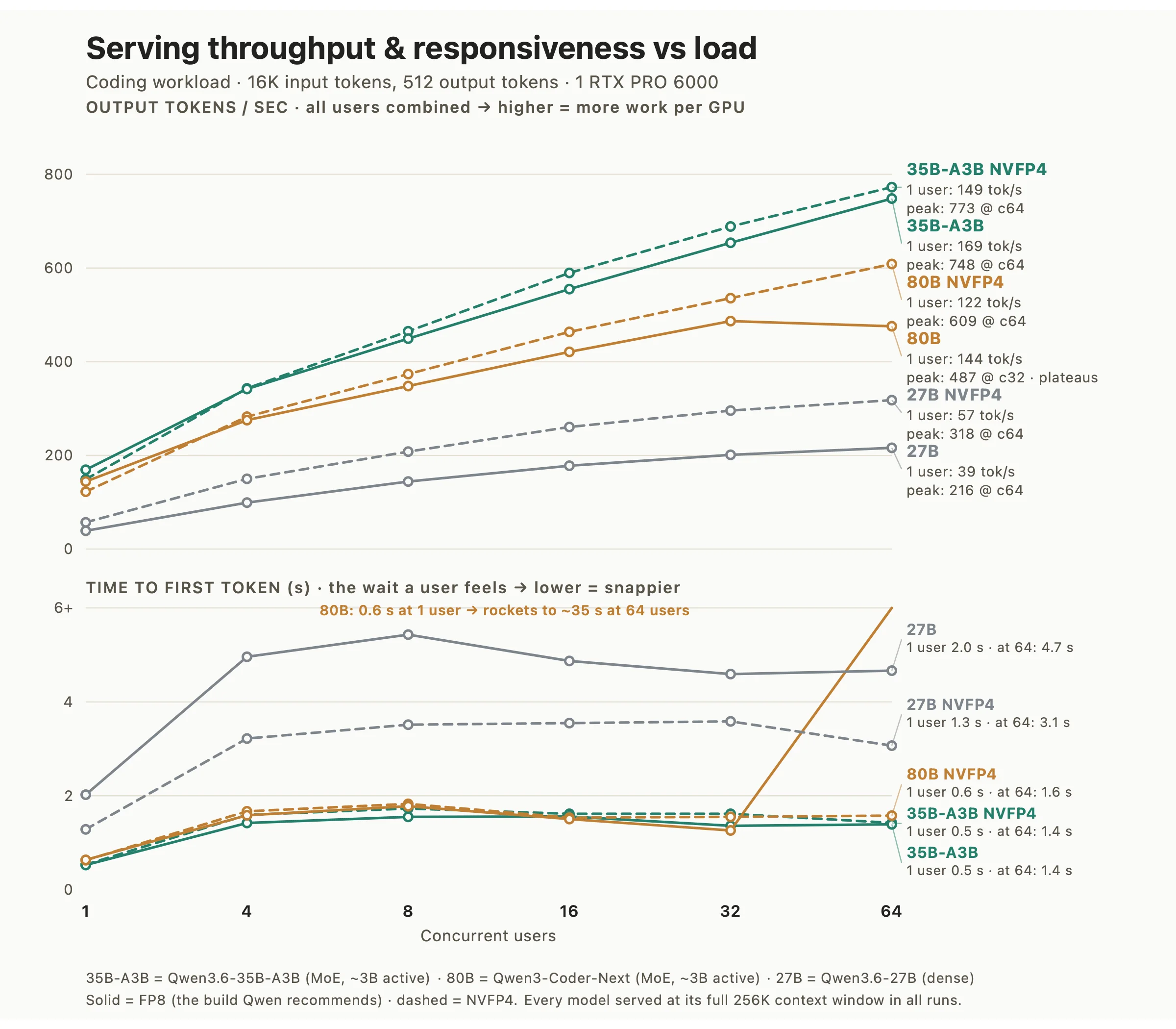
The speed differences here come from architecture, not size. The dense 27B runs all of its parameters on every token it generates, which makes it slow. The two mixture-of-experts (MoE) models use only about 3 billion parameters per token, so they answer much faster even though the full models are larger.
Here is how the three compare under the 16K agentic load, looking at both responsiveness (the time to first token, or TTFT) and raw speed (throughput, measured in tokens per second):
- 35B-A3B (MoE) is the best build overall. With a single user it returns the first token in about half a second, and even with 64 users hitting it at the same time that wait only rises to around 1.4 seconds. It also has the highest throughput of any build we tested, which means it produces the most tokens per second of the six.
- 80B Coder-Next (MoE) is also fast and holds up well up to about 32 concurrent users, with a first-token wait of under a second at low load.
- 27B (dense) is the slowest of the three. Because it runs every one of its parameters on every token, it takes about two seconds to return the first token and peaks at around 216 tokens per second, which is roughly a third of what 35B-A3B manages.
Two more things are worth spelling out:
- It feels close to instant for everyday edits. The numbers above come from the heavier 16K agentic load. On the shorter, back-and-forth edits that a developer makes all day, the model is faster still: the first token comes back in under a tenth of a second, and throughput on those short requests peaks past 2,600 tokens per second.
- Give the 80B model room under heavy load. In FP8, the 80B model starts to struggle past 32 concurrent users. At 64 users its first-token wait jumps from about 1.3 seconds to roughly 35 seconds, and its throughput stops growing. The NVFP4 build avoids that and keeps scaling, so for heavy 80B load we recommend it over FP8.
These speed numbers are also before any extra optimization. Both the 27B and 35B-A3B models support multi-token prediction (MTP), a form of speculative decoding where the model drafts several tokens ahead and verifies them in a single pass. On this same RTX PRO 6000, turning it on made the dense 27B about 1.73x faster in our run, and we wrote up the full setup here. Speculative decoding works in vLLM too, the server we used for this study, where it gave a 1.4 to 1.6x speedup in our benchmarks. Each is another way to get more out of the same card.
Does quantizing the model hurt it?
Quantization saves memory, but the obvious worry is whether the smaller model still behaves like the original, or whether shrinking it quietly changed its answers. To check, we ran a Kullback-Leibler divergence test. It's a standard way to measure how far a quantized model's predictions have moved away from the full-size version, and it's the same check the Unsloth team uses to validate their own quantized models. Put simply, it tells you how often the smaller model would have picked the same next token as the original. Higher is closer.
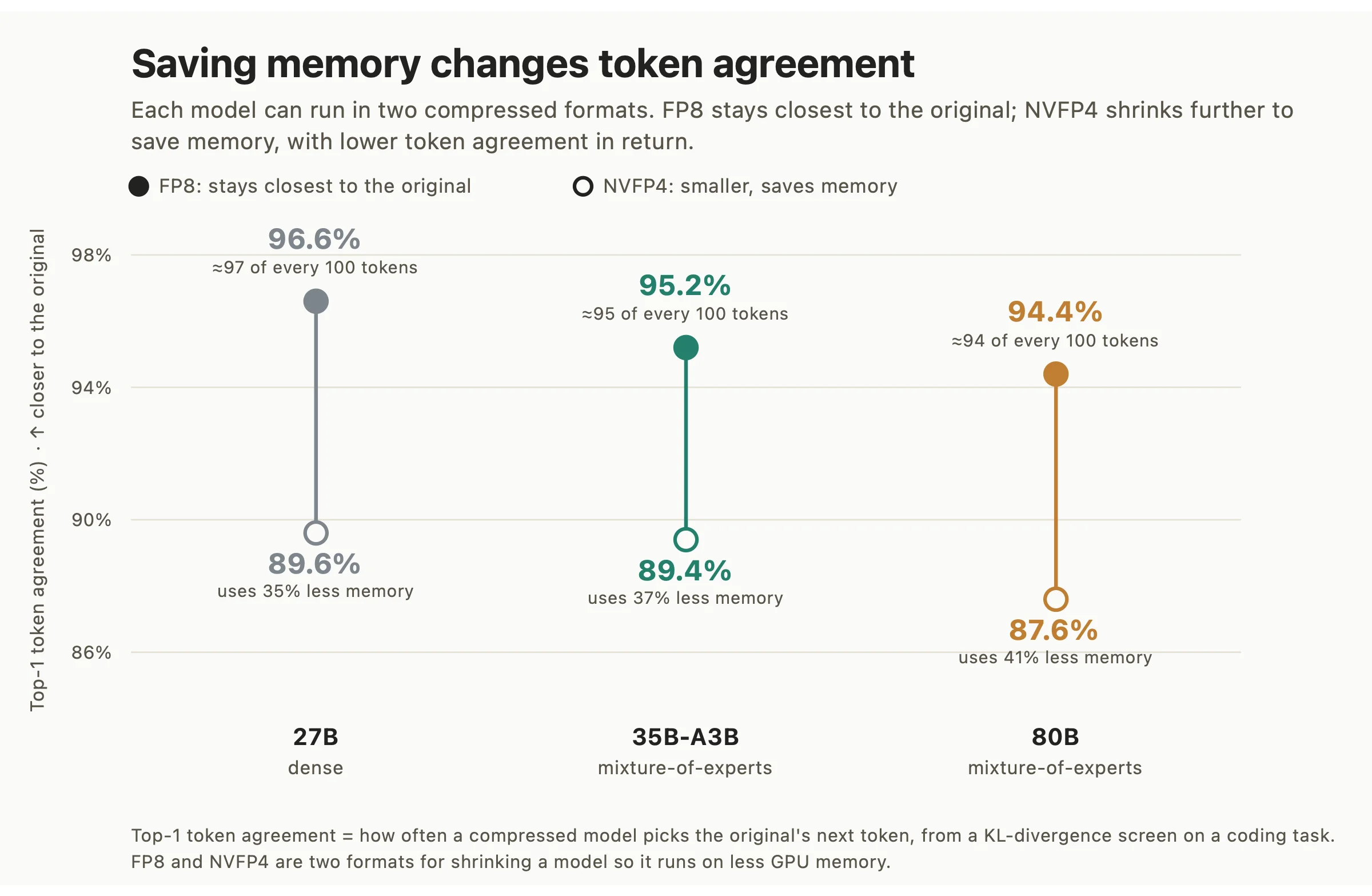
FP8 does well. Across all three models it matches the original 94 to 97 percent of the time, which is why the Qwen team recommends FP8 for serving. NVFP4 gives some of that back, down to around 88 to 90 percent, in exchange for roughly a third less memory. Whether that's a good trade depends on how tight your memory is.
This check only tells you whether quantization kept the model intact, not how good the model is at coding. For that, the benchmark scores above are the real signal. We did run a quick functional check on every build too, asking each one to write a small function, make a tool call, and return structured JSON. All six passed, the NVFP4 builds included, so the memory savings didn't break basic coding behavior.
If you want the deeper dive on the quantization formats and how they're benchmarked, we go into that here.
What NVFP4 actually trades off
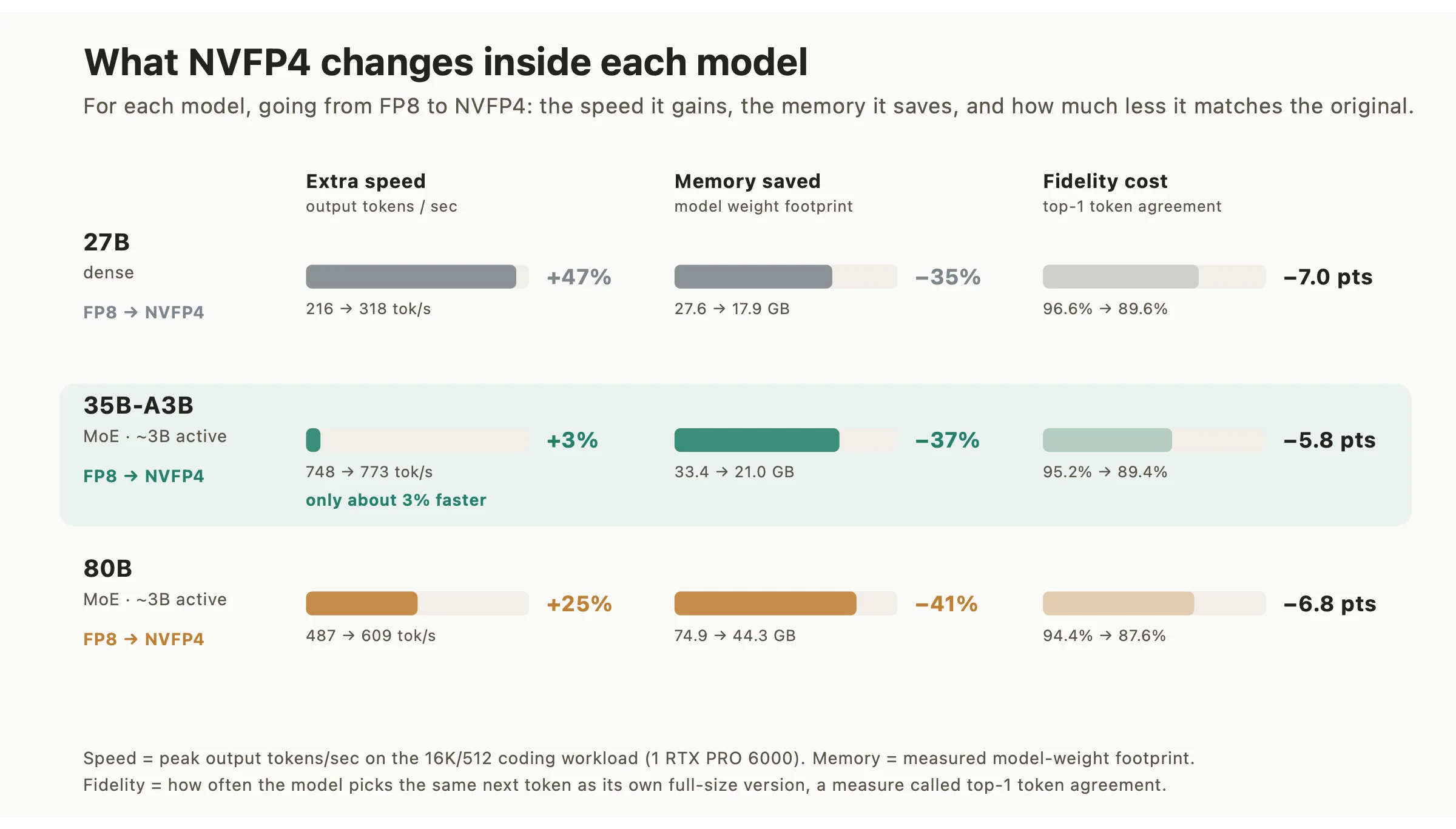
Going from FP8 to NVFP4 always frees up about a third or more of the model's memory. What you get back in speed depends on the model.
On the dense 27B and the 80B, NVFP4 gives you real extra speed on top of the memory savings, 47 percent more tokens per second on 27B and 25 percent more on 80B. On 35B-A3B it frees the same memory but only adds about 3 percent speed, because that model already uses so few parameters per token that it isn't held back the same way. So on 35B-A3B, FP8 is the better default, and you'd switch to NVFP4 mainly when you need the memory back.
That freed-up memory does real work. Beyond the model's own weights, most of a GPU's memory goes to the KV cache, the space that holds each active user's context while the model replies. Shrinking the weights leaves more room for that cache, so a single card can serve more users and longer conversations at the same time. With NVFP4, a 96 GB card running 35B-A3B can hold around 6 million tokens in its KV cache, which is room for many long coding sessions, or thousands of shorter ones, in parallel. If you want the deeper technical version of this on the same GPU, we wrote that up here.
What it costs
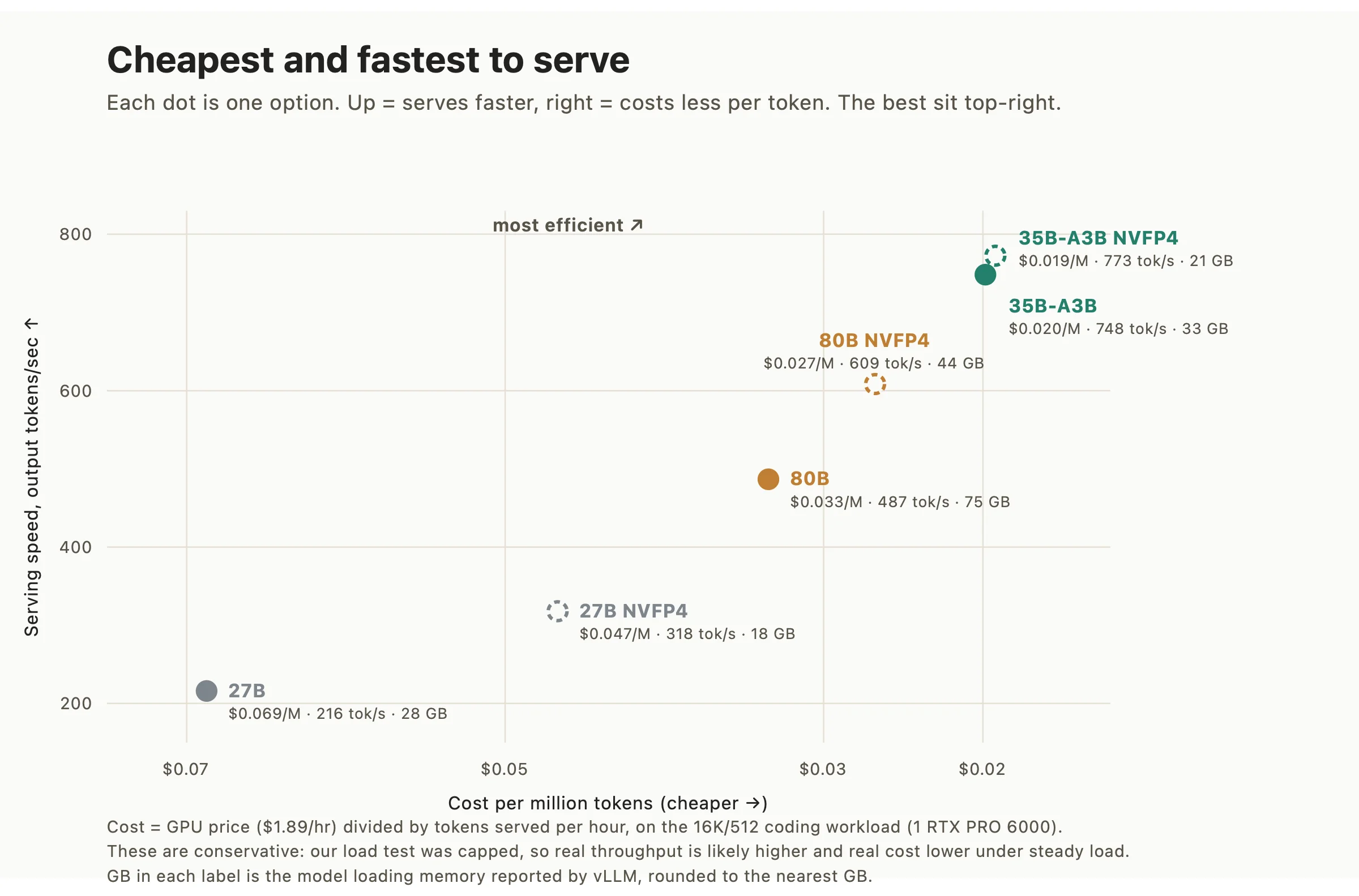
Cost comes straight out of speed. We take the GPU price of $1.89 an hour and divide it by the tokens a build serves in that hour, which gives a cost per million tokens. By that measure 35B-A3B is the cheapest to run, at about $0.019 to $0.020 per million tokens.
27B is the most expensive at $0.069 per million tokens, around three and a half times 35B-A3B, even though it's the smallest model of the three. The reason is the same: a dense model runs every parameter on every token, which is slow, and slow means fewer tokens per dollar.
The counterintuitive part is that size doesn't decide cost. The 80B model is cheaper to serve than the 27B, at $0.027 against $0.069 per million tokens, even though it is three times larger, because the 80B is mixture-of-experts and the 27B is dense. NVFP4 also lands both cheaper and faster than FP8 for every model, which is why 35B-A3B in NVFP4 ends up the fastest and cheapest of all six builds.
The recommendation
There's no single right answer here. It depends on what you care about most. This is how we laid it out for the customer.
- For most teams, go with Qwen3.6-35B-A3B in FP8. It was the cheapest and fastest to serve, it stayed close to the original in the quality check, and it passed every smoke test for normal coding, tool calls, and structured output. This is the build to start with.
- If coding quality is the priority, use Qwen3.6-27B in FP8. It's the best on the benchmarks and competes with much bigger models. The downside is it's slower and costs about three and a half times as much.
- If memory is tight, go with an NVFP4 build. It frees 35 to 41 percent of the GPU's memory and lets you serve more users at once, in return for some drift from the original. The payoff is biggest on 27B and 80B.
Deploying it without managing a GPU
Once you've picked a model, you still have to run it in production, and the simplest way to do that on JarvisLabs is our serverless platform. You give it an open model, a serving framework, a GPU, and a range of workers to scale between, and it serves the model behind an OpenAI-compatible endpoint, which means you point an existing OpenAI client at a new base URL and change nothing else in your code. You can serve with vLLM, SGLang, or Ollama, and since we ran vLLM for every measurement in this post, those speed and cost numbers carry straight over.
When you create a deployment, it downloads the model once to persistent storage, starts the GPU workers that serve it, and routes each request to a worker that has room. As traffic rises it adds workers up to a limit you set, and as traffic falls it removes the idle ones. If nothing is calling the endpoint, you can let it scale all the way down to zero.
Billing follows the workers. Each one is billed only while it runs, covering its GPU and the disk that comes with it, so the workers you keep always-on bill the whole time, while any extra ones that scale up under load bill only for the minutes they are up and stop the moment they are removed. The one thing that bills continuously is the storage that holds your model, which stays ready to serve even when every worker has scaled down. When it scales to zero, you pay for that stored model and nothing for compute until the next request arrives.
You can set this up two ways. The dashboard walks you through it as a form, or you can do it from the command line with the jl CLI:
jl deploy create \
  --name qwen-coder --region IN1 --framework vllm \
  --gpu RTX-PRO6000 --gpus-per-worker 1 \
  --min-workers 0 --max-workers 3 \
  --idle-timeout 600 --wait-time 60 --storage 100 \
  --model Qwen/Qwen3.6-35B-A3B
That deploys our recommended model on the same RTX PRO 6000 we tested and gives you an endpoint you can call right away. You still choose the model and your data stays with you. You just don't have to take care of the GPUs yourself. There's more on the configuration and the API in our documentation.
Owning your inference
That's what owning your inference looks like. The customer ended up with a good model running on infrastructure they control, chosen from real numbers instead of a guess, at a cost they know in advance. Their code stays in-house instead of going out to an external API, and no provider can change the terms or take the model away.
The same logic holds well beyond this one case. You don't need the biggest model out there to get real work done, and for a lot of workloads a smaller open model you run yourself beats a frontier model you rent.
If you want help picking the right model for your workload, talk to us at sales@jarvislabs.ai. If you'd rather deploy it yourself, our serverless platform is the fastest way to get it running. Either way, you stay in control of the model you build on.
Get Started
Build & Deploy Your AI in Minutes
Cloud GPU infrastructure designed specifically for AI development. Start training and deploying models today.
View Pricing