Make Wan 2.2 render about 24% faster in ComfyUI: one setting, near-identical video

In ComfyUI's Wan 2.2 text-to-video template, set the second sampler's cfg to 1.0 and leave the first alone. Each clip renders about 24% faster, with near-identical video. A sampler is the node that runs a model; its cfg value is how strongly the model is pushed toward your prompt.
On one NVIDIA H200, with the template as it ships on Jarvislabs, a 5-second 1280×720 clip went from 632 to 477 seconds. That is about 2.5 minutes back on every clip, or 4.3 hours over 100 clips.
What did we run?
- Model: Wan 2.2 T2V A14B with the fp8 weights the template lists. fp8 stores each of the model's numbers in 8 bits to save memory.
- Settings: 81 frames (5 seconds at 16 frames a second) and 20 steps, passes that each remove some noise. Sampler_name euler, scheduler simple, shift 5, turbo off: all as the template ships.
- 720p timing: the Wan 2.2 14B text-to-video template on ComfyUI v0.37.0, as it ships on Jarvislabs, one NVIDIA H200, 2 prompts.
- 640×640 timing and all quality numbers: our study's copy of the same graph, where each sampler has its own cfg, on H200s. 10 prompts for timing; 100 pairs at 720p and 103 at 640×640 for the judges.
The saving comes from running the model 10 fewer times, so the share saved should be similar on any GPU that fits the models. That excludes offloading, moving parts of a model to system memory while it runs. The quality result is against the fp8 default, not full-precision weights.
How much faster is it?
Setting the second sampler's cfg to 1.0 saves about a quarter of each Wan 2.2 clip's time, at both sizes we timed.
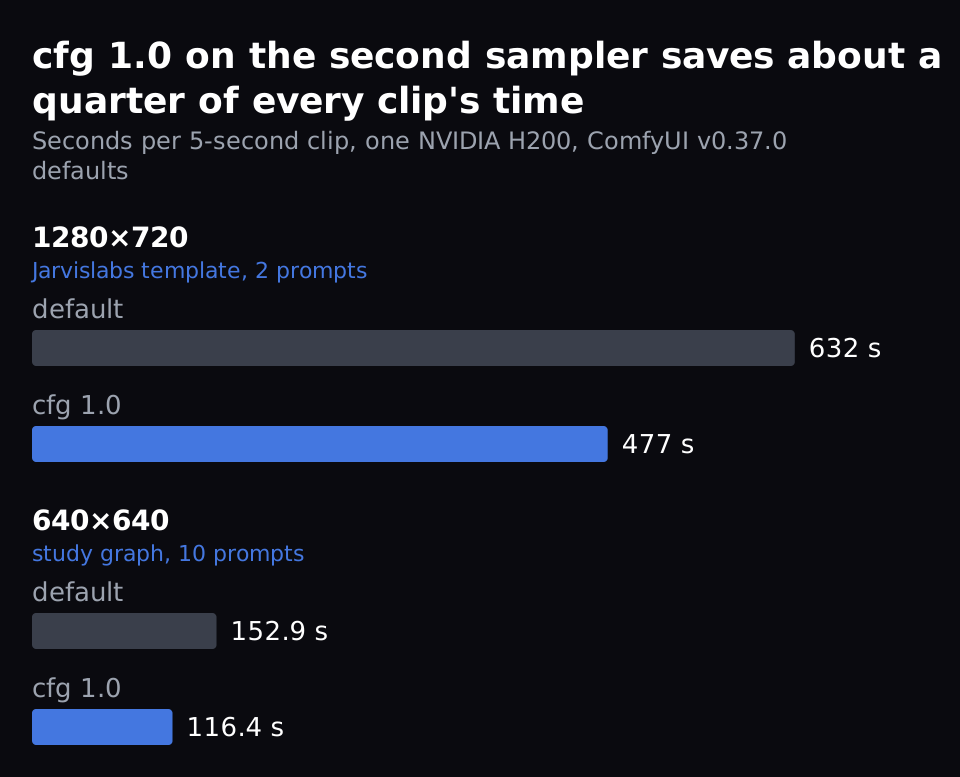
Both use ComfyUI v0.37.0 with its default settings and no speed flags (the launch options that switch on faster maths). We cleared ComfyUI's cache before every timed clip, after one warm-up run (a throwaway run, so loading the models isn't timed).
Does the video change?
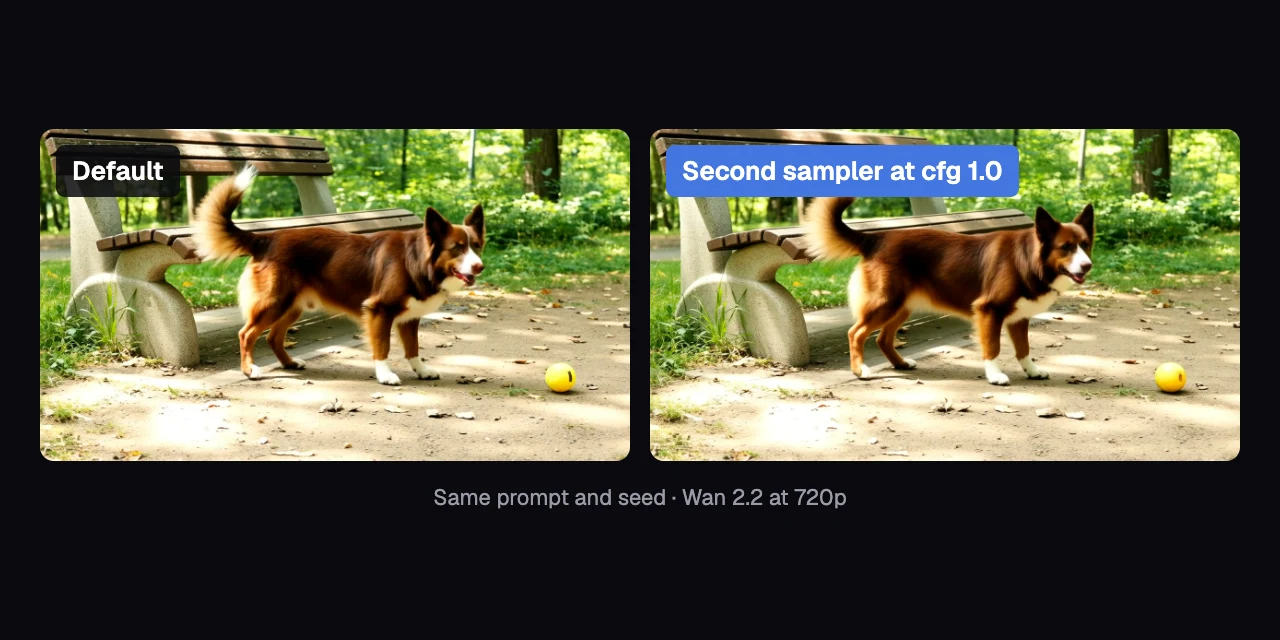
Barely: with the second sampler at cfg 1.0, a Wan 2.2 clip comes out near-identical. We made each video twice from the same prompt and seed, the number that picks the starting noise. One copy used the default, the other cfg 1.0, so any difference comes from the setting.
Left: the default. Right: the second sampler at cfg 1.0. Same prompt and seed at 720p: a brown dog waits beside a park bench, then walks toward a yellow ball.
To measure how much the video changes, we compared the two renders pixel by pixel. Every pixel's colour is stored as numbers from 0 to 255; we measured how far those numbers moved, on average. 0 means identical, 255 means completely different.
At 720p the two videos differ by 2.3 (80 pairs): about 1% of the scale, too little to see. A new seed, a whole new video, differs by 52.6. At 640×640 the numbers are 2.8 (110 pairs) against 54.2: a new seed changes the video about 20 times more than our change does.
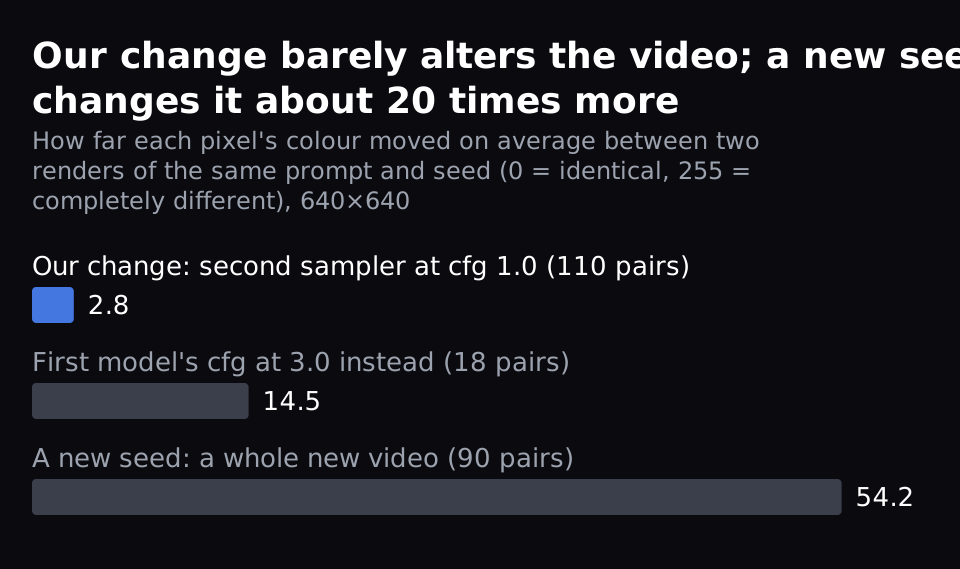
Changing the first model's cfg instead, to 2.0, 3.0 or 5.0, moved the 640×640 clips by 14.5 to 29.3 (18 to 20 pairs each). That's the trap in the steps at the end.
Does it look worse?
No: two AI judges scored both versions the same. GLM-5.3-Flash and Qwen3.8-Flash-Next scored all 200 clips of 100 matched pairs at 720p (20 prompts × 5 seeds), without knowing which setting made which clip. They score each clip from 0 to 3 on five things, and a score counts only when the two judges agree within 1 point.
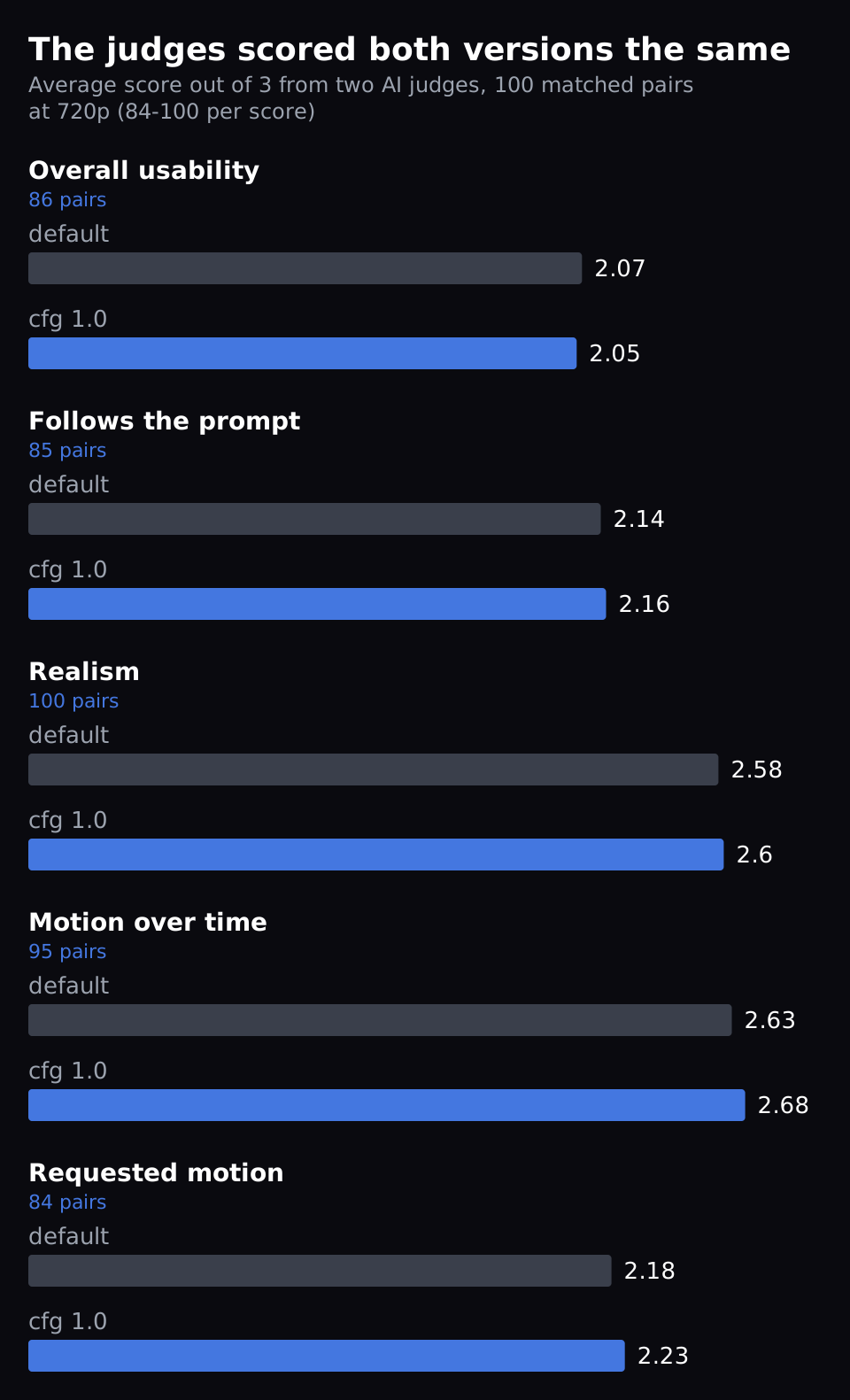
The averages differ by 0.06 or less on the 0-3 scale. For each score, the range the true difference likely sits in includes zero or just touches it. So the judges found no quality difference they could measure. At 640×640, over 103 pairs, every score moved by less than 0.06.
We left one score out: detail. At 720p the two judges didn't agree on it often enough to trust it. An earlier round of 20 pairs hinted at slightly less detail; 78 more pairs didn't repeat it.
What is the setting, and why does it save time?
The setting is the cfg value on the second sampler of ComfyUI's Wan 2.2 template. At 1.0, ComfyUI runs that sampler's model half as often.
Wan 2.2 makes a video in 20 steps, and two models share them:
- The first model runs steps 1 to 10. It sets up the scene and the motion.
- The second model runs steps 11 to 20. It adds the fine detail.
The template calls them the high-noise and low-noise models, after how much noise is left when each one starts. Each has its own sampler.
By default, every step runs its model twice. One run uses your prompt. The other uses the negative prompt, the list of things to avoid.
The cfg value sets how far the result is pushed away from the negative-prompt run's answer, toward your prompt's. At cfg 1.0 the result is just the prompt answer, so ComfyUI skips the negative-prompt run (comfy/samplers.py).
Set cfg to 1.0 on the second model only, and its 10 steps run once instead of twice. That makes 30 runs of the model per video instead of 40. One side effect: the negative prompt no longer affects the second model's steps.
Why does the video barely change? Our reading, which we didn't test directly: by step 11 the first model has already set up the scene. The second model's push toward the prompt has little left to change. Think of two painters on one canvas: the second only adds detail, and doesn't need the brief shouted at every brushstroke.
Why does 720p take four times as long?
A 1280×720 Wan 2.2 clip gives the model 2.25 times as much to work on as 640×640. The biggest part of the work grows faster than that. It took 4.2 times as long on an H200 in our study (5 prompts, cache cleared before each clip): 642.8 s against 153.2 s.
Wan 2.2 cuts a video into tokens, small patches it works on: 33,600 at 640×640 and 75,600 at 720p. Attention, the part where every token is compared with every other, grows with the square of the tokens. The rest of the work grows in step with them, so the total lands in between.
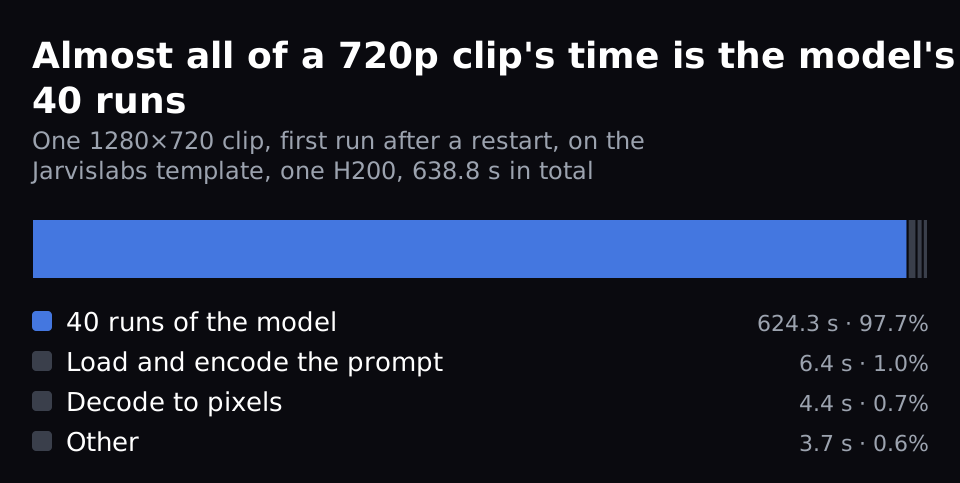
Almost all of a 720p clip's time is the model's 40 runs, about 15.6 seconds each. In one 720p clip on the Jarvislabs template on one H200, the first after restarting ComfyUI, they took 624.3 of 638.8 seconds. Skipping 10 of them saves a little under 25%: reading the prompt and turning the result into pixels take the same time either way.
How do you change it in ComfyUI?
Inside the Wan 2.2 template's node, drag the second sampler's cfg wire off and set its cfg to 1.0. Checked on the Jarvislabs ComfyUI template, ComfyUI v0.37.0, on 8 Oct.
- Open the Wan 2.2 14B Text to Video template (Templates, in the left sidebar). Its settings sit on one node: set the size there (640 × 640 is the default; 1280 × 720 for 720p) and leave enable_turbo_mode off.
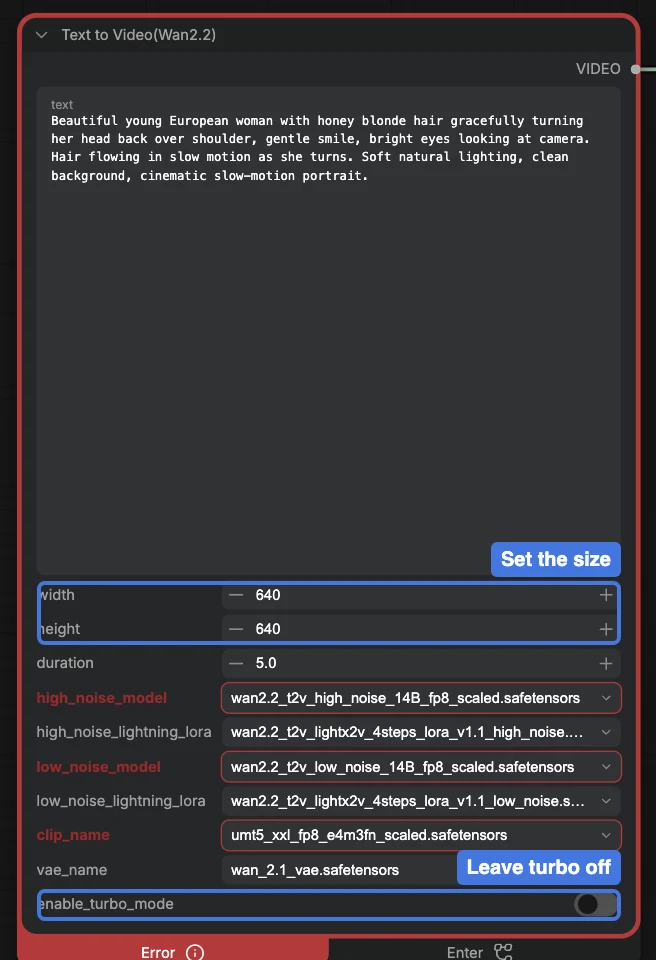
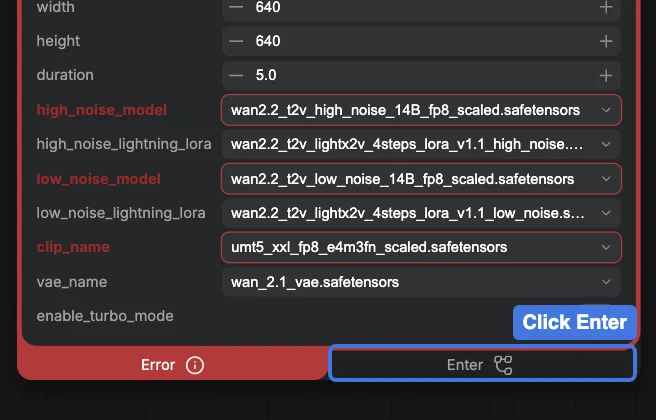
- Open the node's inner graph: click Enter at the bottom of the node.
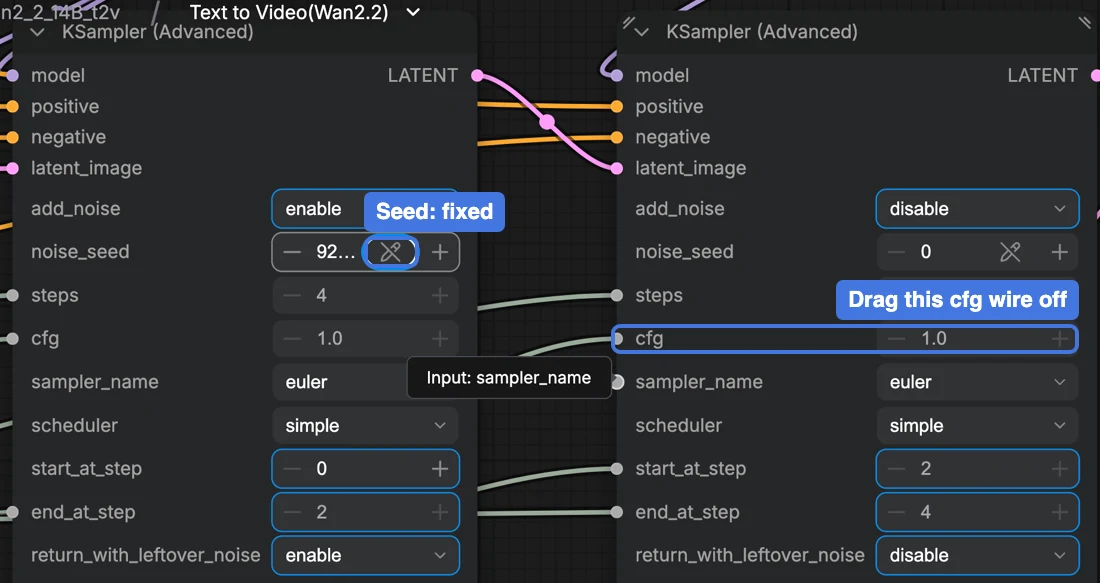
- Inside are two KSampler (Advanced) nodes. To compare against the default, first fix the seed: on the left sampler, click the shuffle icon beside noise_seed and choose Fixed Value. Then, on the right one (the second, low-noise sampler), drag the wire off its cfg input and drop it on empty canvas. If a search box opens, press Esc.
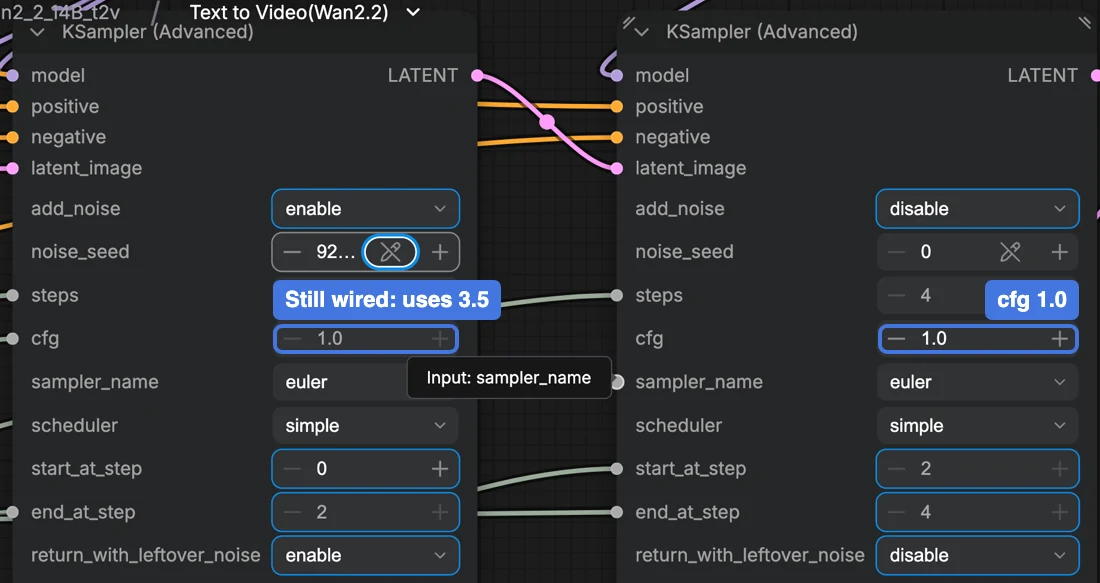
- Set its cfg to 1.0 (it may already show 1.0). Leave the first sampler alone: its cfg stays wired to the shared value of 3.5, even though the greyed box shows a stored number.
- Go back to the main graph: click the workflow's name at the top left. Then press Run.
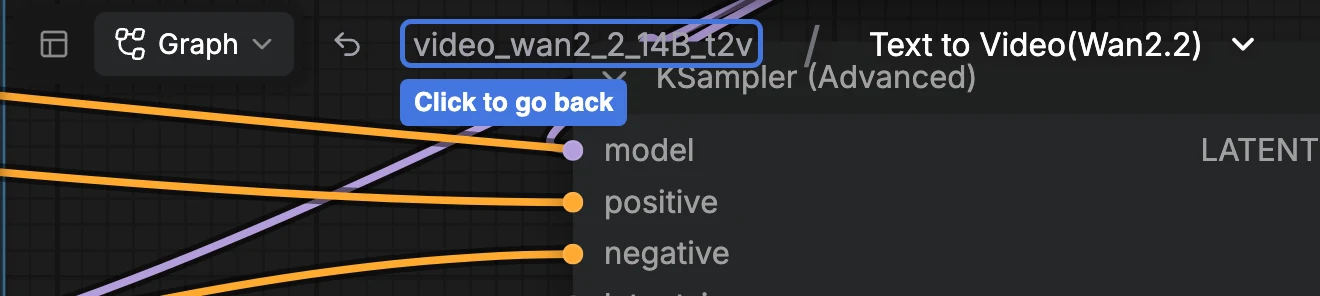
The trap. The template feeds both samplers from one shared value, labelled CFG. Change that value instead, and the first model's cfg changes too, which moves the video a lot (see "Does the video change?" above).
Timing it yourself. Clear ComfyUI's cache between runs.
When only the second sampler changed, ComfyUI reuses the first sampler's cached result. The run then looks far faster than it is: in one early test of our study's graph at 640×640, 42.9 s instead of 156.5 s. We cleared it before every timed run with ComfyUI's /free request. Send it from the instance's terminal to port 6006, ComfyUI's port on Jarvislabs:
curl -X POST http://127.0.0.1:6006/free -H 'Content-Type: application/json' \
  -d '{"free_memory":true,"unload_models":false}'
It prints nothing when it works; an error means ComfyUI isn't on that port.
FAQ
Isn't cfg 1.0 only for Lightning or other distilled models?
Not for Wan 2.2's second sampler. A distilled model is trained to run in a few steps at cfg 1.0, like Wan 2.2 with turbo mode on (see below). Everything in this post used the standard Wan 2.2 14B model with turbo off. Only the second sampler was at cfg 1.0; the first stayed at 3.5.
Does the cfg 1.0 change stack with SageAttention or other speed flags?
We haven't measured it. Our reading: cfg 1.0 cuts the model's runs from 40 to 30. SageAttention, a faster way to compute attention, makes each run quicker without changing how many there are. So we expect cfg 1.0 to still save close to a quarter of the shorter render time, not a fixed 155 seconds.
Why not set both samplers to 1.0?
We didn't test Wan 2.2's first sampler at cfg 1.0. Its model sets up the scene, and changing its cfg moved our clips far more than this change does ("Does the video change?").
Does it work with turbo mode on?
There's nothing to add: turbo mode already runs both samplers at cfg 1.0. It switches on the Lightning LoRA, a small add-on file that makes the model run in 4 steps at cfg 1.0. In our study (5 prompts, one H200) it was 85.3% faster than the default at 640×640.
But it makes a different video, not a faster copy. With the same prompt and seed at 640×640, it changed the clip by 71.0 (100 pairs), more than a new seed's 54.2. Our judges didn't score it lower on those 100 pairs, so it suits you if a different take on each shot is fine.
Get Started
Build & Deploy Your AI in Minutes
Cloud GPU infrastructure designed specifically for AI development. Start training and deploying models today.
View Pricing