DeepInfer: What DeepSeek Open-Sourced, and What It Kept
DeepSeek open-sourced DeepInfer yesterday. It is the inference engine behind their DeepSeek-V4.1-Flash API. According to DeepSeek, a single cluster running it serves 155 trillion tokens a day and earns about $38 per GPU-hour, and that's at off-peak prices. It's the same engine they run in production, released under Apache 2.0.
I spent last night reading the repo and the deployment Q&A DeepSeek published with it. This post is my notes: what's actually in the box, what isn't, and the handful of design decisions I think matter for anyone serving large MoE models. The headline numbers are impressive, but the parts I found most useful were deeper in their docs.
What's in the Repo, and What Isn't
The first thing I'd point you to is a short section in the README titled "Required for a complete inference service (not included in this release)". It tells you what you're not getting.
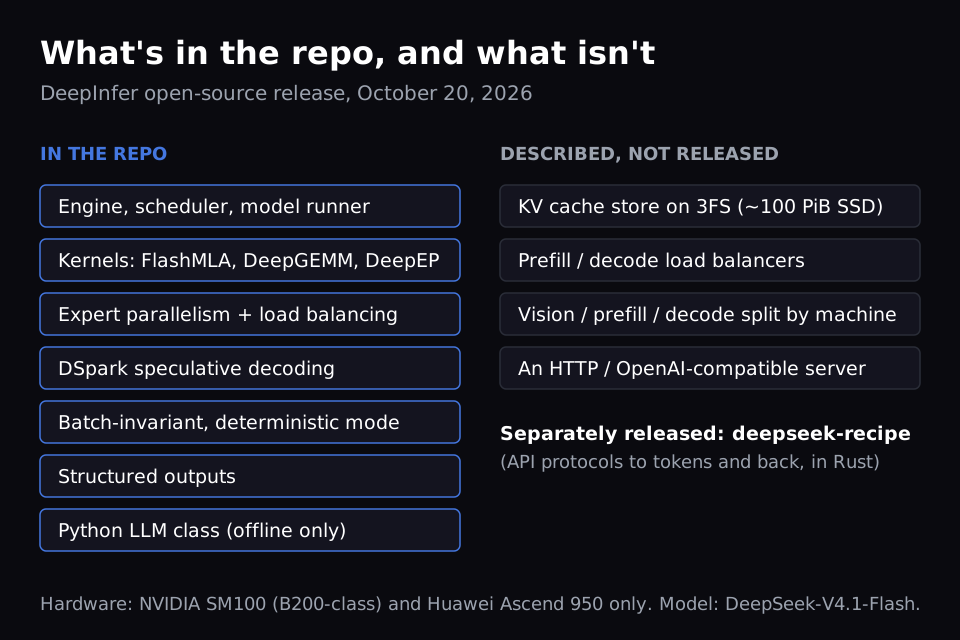
In the repo: the engine itself, DeepSeek's kernel libraries (FlashMLA, DeepGEMM, DeepEP), expert parallelism with load balancing, DSpark speculative decoding, deterministic inference, structured outputs, and the benchmark scripts behind their charts.
Not in the repo:
- The KV cache store (built on their 3FS file system)
- The load balancers that spread requests across prefill and decode replicas
- The full system that splits vision encoding, prefill and decode across machines, although DeepSeek says most of the engine-side support is already there
- Any HTTP server. The only entrypoint is a Python
LLMclass, so today it runs offline batch inference only
DeepSeek says the KV cache and load-balancing code is tightly coupled to their internal infrastructure, so it's "not yet fully open-sourced". That makes sense, but it also means that if you want to run this as a service, the hardest parts are still yours to build.
Two more things decide whether you can use it at all:
- Hardware: NVIDIA SM100 (B200-class) GPUs and Huawei Ascend 950 NPUs. No H100 or H200 support.
- Model: DeepSeek-V4.1-Flash only, for now. DeepSeek says future models will land here too.
DeepInfer was originally built primarily on vLLM, so if you know vLLM's codebase, a lot of this will look familiar. Here's DeepSeek's own picture of the full system. DeepInfer is the engine inside the prefill, decode and vision encoder services. The entrypoint, the load balancers and the KV cache storage are not in the release.
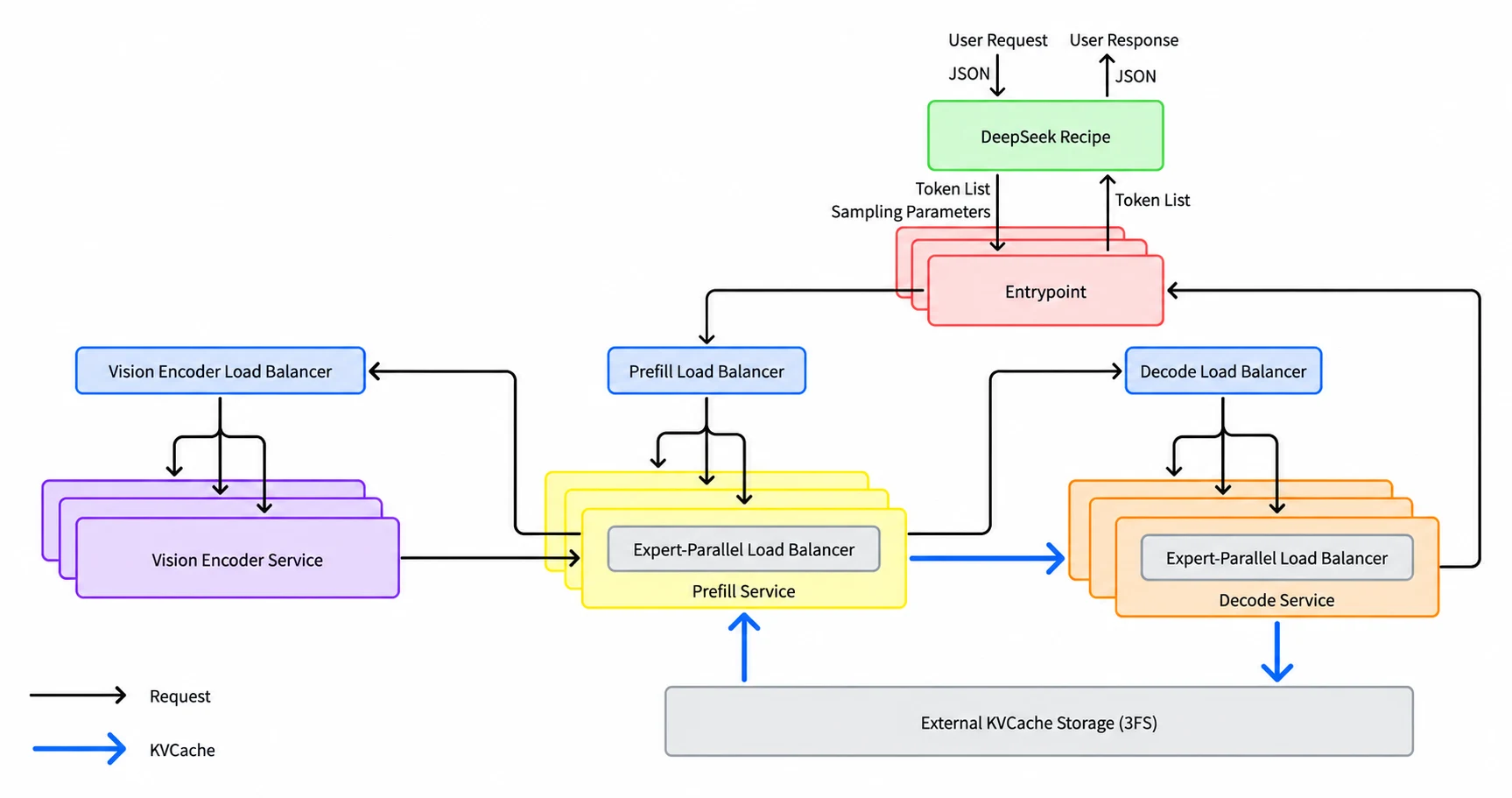
Source: DeepSeek, DeepInfer repository (Apache 2.0).
How Big Is the Cluster?
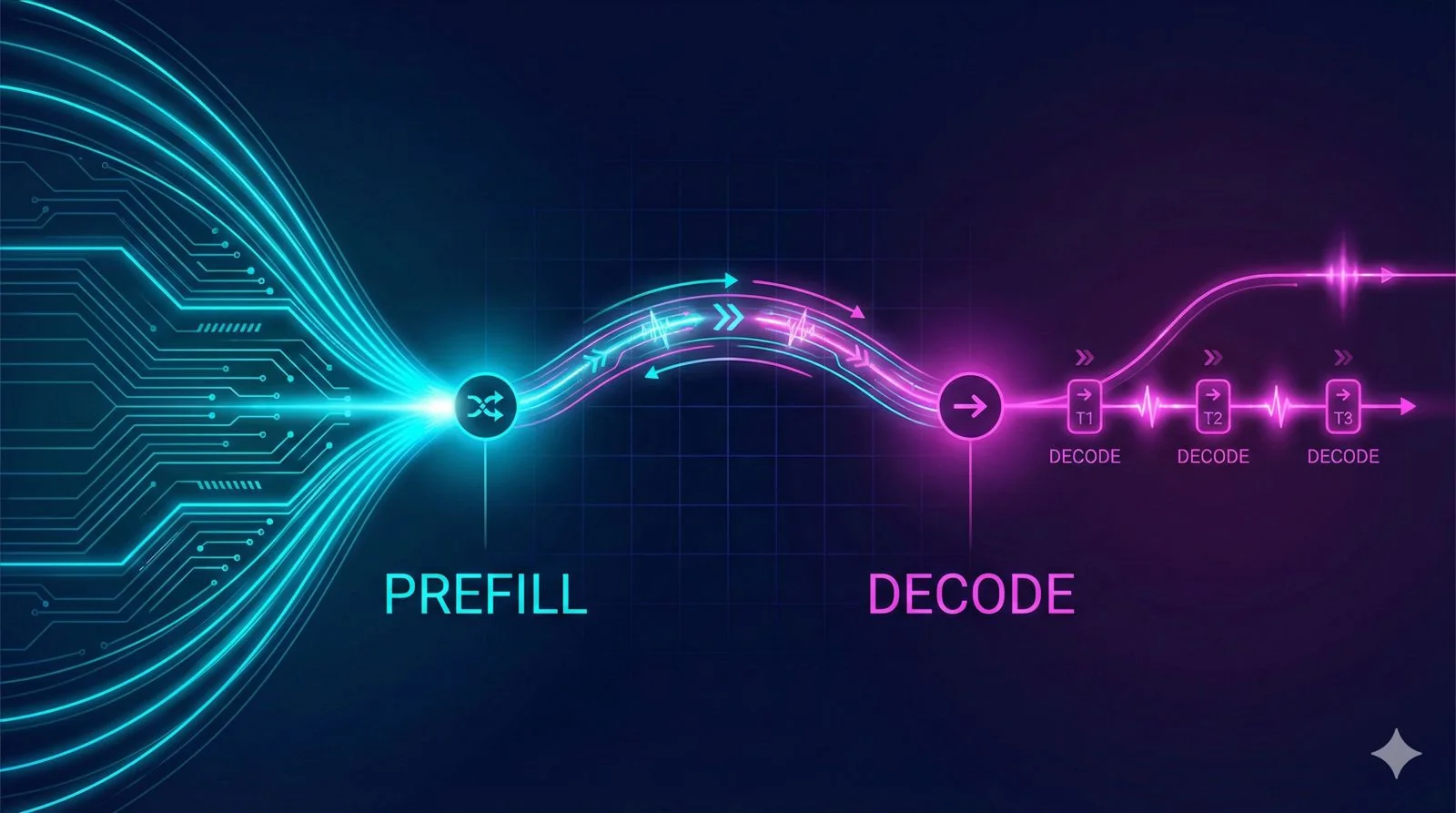
DeepSeek separates prefill (reading the prompt) from decode (generating the answer), and sizes them very differently:
| Building block | Size |
|---|---|
| Prefill machine | Ordinary 8-GPU server, EP2 to EP8 |
| Decode instance | 64 to 128 GPU supernode, EP64 to EP128 |
| Prefill to decode GPU ratio | About 1:1 |
| Smallest efficient deployment | 64 prefill GPUs + 64 decode GPUs |
| KV cache storage | About 14.4 TB per GPU |
They don't publish the total GPU count. A rough estimate of my own: about 100 PiB of KV storage at 14.4 TB per GPU, with some allowance for erasure-coding overhead, comes out to somewhere around 6,000 to 8,000 GPUs. That assumes the 100 PiB serves only this cluster, which the docs don't say, so treat it as an order of magnitude.
So why does decode need 64 GPUs when prefill works fine on 8? Answering that explains most of the design.
Why Decode Gets 64 GPUs
DeepSeek-V4.1-Flash is a mixture-of-experts model with 384 routed experts. Each token only goes through a few of them. Expert parallelism (EP) is how many GPUs you spread those experts across.
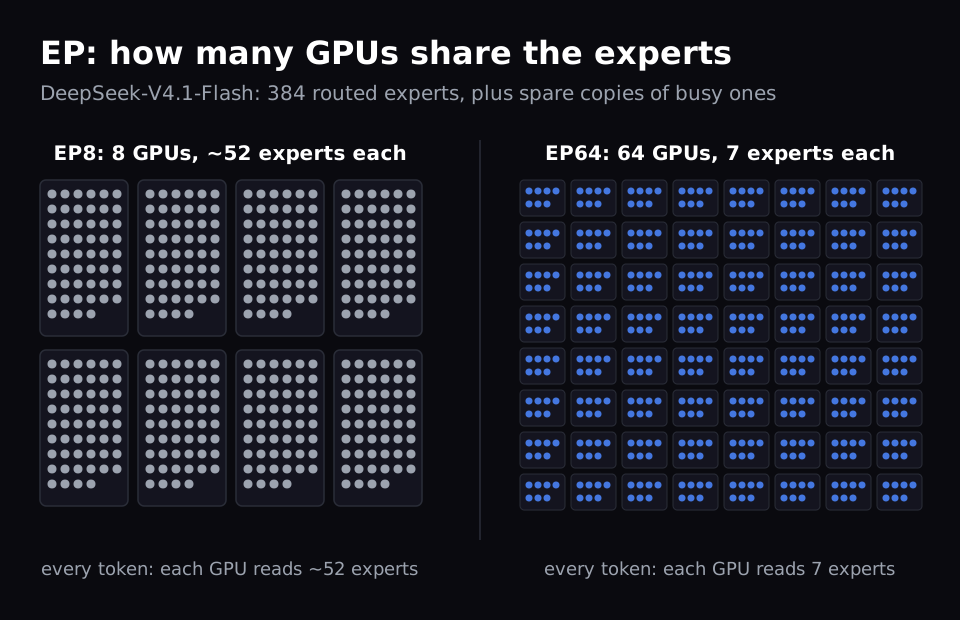
The model fits on 8 GPUs either way. What changes is how often the weights have to be read. A GPU's main memory (HBM) holds all the weights, but the on-chip memory where the math happens is roughly a thousand times smaller. So weights stream from HBM to the chip, get used, and get thrown away.
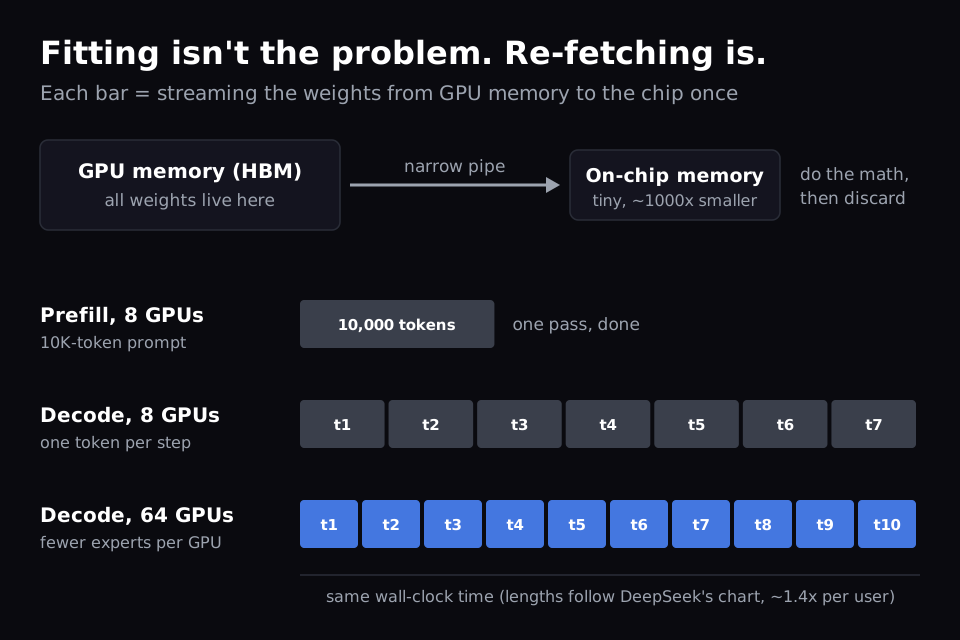
- Prefill streams the weights once and uses them for thousands of prompt tokens. The GPU spends its time doing math. This is what people call compute-bound.
- Decode streams the weights again for every generated token. The GPU spends its time waiting on memory. This is memory-bound.
With EP64, each GPU holds 7 experts instead of about 52 (counting spare copies, as in DeepSeek's benchmark setup), so each pass reads less and finishes sooner.
What DeepSeek's EP8 vs EP64 chart shows
DeepSeek published an EP8 vs EP64 decode benchmark. I pulled two points from it and compared them per GPU, because per GPU is what you pay for.
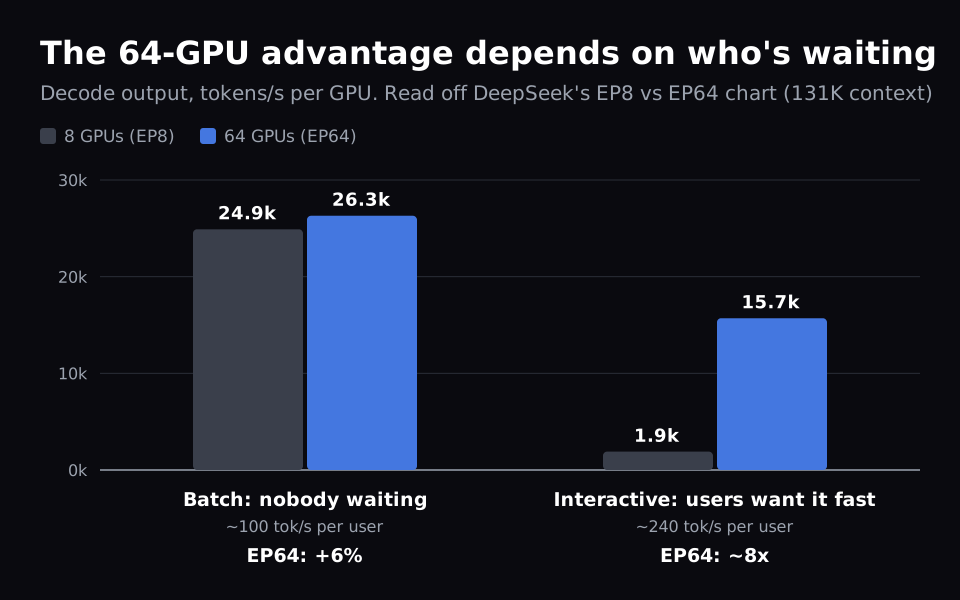
| Scenario | Per-user speed | EP8 (tokens/s/GPU) | EP64 (tokens/s/GPU) | EP64 advantage |
|---|---|---|---|---|
| Batch, 256 requests per GPU | ~100 tokens/s | 24.9k | 26.3k | ~6% |
| Interactive | ~240 tokens/s | ~1.9k | ~15.7k | ~8x |
Read off DeepSeek's chart: 131K context, 3 draft tokens, 75% per-token acceptance.
The 64-GPU setup is a big win only when users want fast responses. For batch work, where you can pack hundreds of requests into each step and nobody is waiting, an 8-GPU box gets about 94% of the per-GPU throughput.
So you don't need 128 GPUs to get value from this. The big cluster is what you pay for fast responses. And since today's release only does offline inference, the 8-GPU batch case is the one most people can actually run.
DSpark: Getting More Than One Token per Pass
If decode costs one full weight pass per token, the obvious move is to get more than one token out of each pass. That's speculative decoding: a small draft model guesses ahead, and the big model checks the guesses in one pass.
DeepSeek drafts 5 tokens every step. What's different is how many of those 5 get checked.
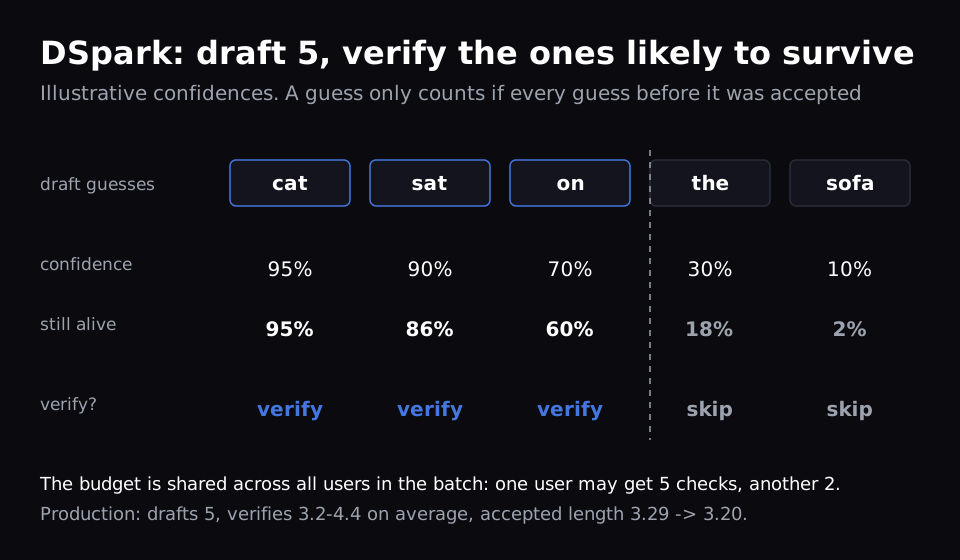
A guess only counts if every guess before it was accepted. So a confidence head scores each draft token, and the scheduler only checks the guesses likely to survive. The checking budget is shared across the whole batch, so one request might get all 5 checked while another gets 2.
The result is small but interesting. At their production load of about 60 requests per GPU, DeepSeek estimates +4 to 7% throughput. At 96 it's +11%. At 16 it's slightly negative (−1.5%). When the GPU is busy, every wasted check takes room from someone else's work, so skipping unlikely guesses pays off. When the GPU is quiet, checking is nearly free and skipping only loses the occasional hit. In the open release this mode is opt-in (DEEPINFER_ENABLE_MTP_VARLEN=1).
KV Cache: Keeping Conversations Around for Days
When the model reads a prompt, it produces intermediate state for every token: the KV cache. Keep it, and the next turn of the conversation only needs prefill for the new tokens.
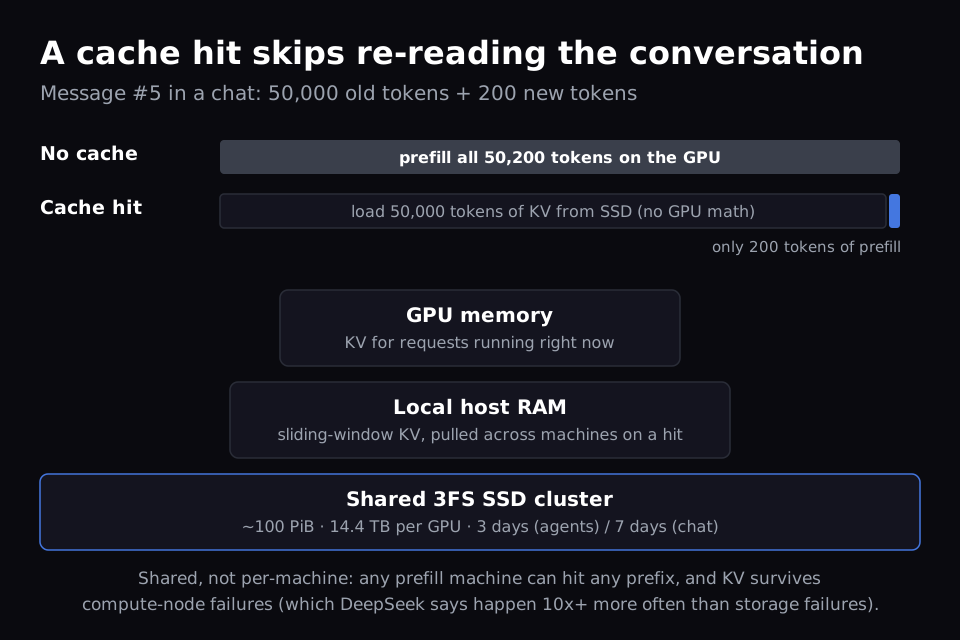
DeepSeek's design goal was to keep KV cache for more than 72 hours. They run about 100 PiB of SSD on a dedicated 3FS cluster, and keep KV for 3 days for agent traffic and 7 days for chatbot traffic.
The agent vs chatbot split is the detail I found most interesting. DeepSeek says chatbot traffic has "a much heavier long tail of hits": a small amount of KV cache gets read very many times. Cutting chatbot retention to 3 days costs 0.5 to 1% of cache hit rate. DeepSeek doesn't explain the agent side. My guess is that agents reuse their KV within one fast session and then move on.
They keep it in one shared pool for two reasons. Any prefill machine can hit any prefix, so the load balancer never has to send a conversation back to "the machine that remembers it". And the KV survives hardware failures, since DeepSeek says compute nodes fail more than 10x as often as storage nodes.
Is 14.4 TB of SSD per GPU worth it?
That sounded like a lot to me until I worked it out per hour. Here's a rough calculation with assumed numbers:
SSD per GPU    14.4 TB logical → ~17 TB physical (10+2 erasure coding adds ~20%)
Assume         ~$500 per TB → ~$8,500 per GPU, one-time
Amortize       5 years ≈ 44,000 hours → ~$0.20 per GPU-hour
Double it      for servers, network, power → still under $0.50 per GPU-hour
Storage costs cents per hour and GPU time costs dollars, so every cache hit saves expensive GPU time by spending a little inexpensive storage. Enterprise SSD prices vary a lot, so plug in your own numbers. The conclusion doesn't change much. This is also the part they didn't release, so if you want the same cache savings, you'll have to build the storage layer yourself.
Expert Load Balancing
With 64 GPUs each holding 7 experts, every decode step waits for the slowest GPU. If one expert gets far more traffic than the rest, the GPU holding it becomes the bottleneck for all 64.
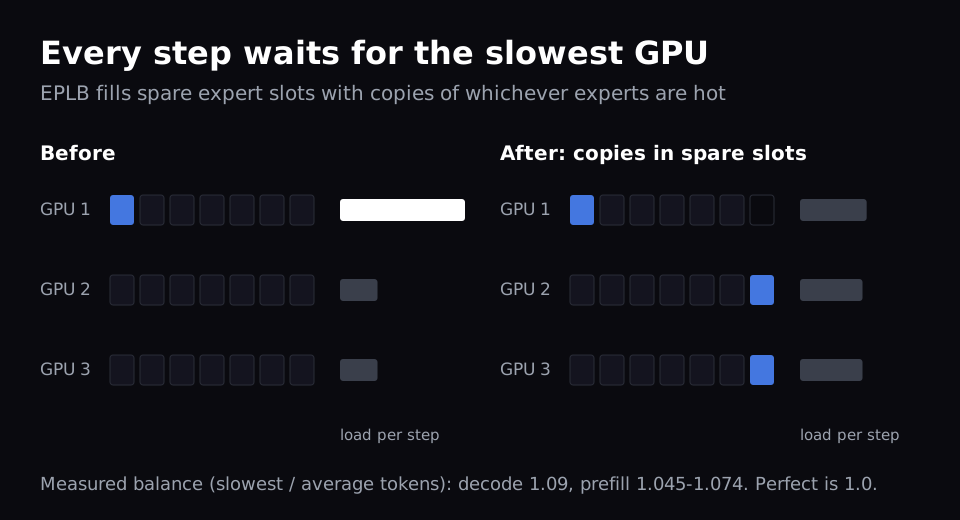
DeepInfer's fix is EPLB: every GPU keeps a few spare expert slots, filled with copies of whichever experts are busy right now, and the layout is reshuffled every 10,000 decode steps. In decode, the busiest GPU ends up handling about 9% more expert tokens than the average one.
One thing I noticed in the code: that balance is measured in token counts, and the rebalancing is driven by token counts too (deepinfer/model_executor/eplb/__init__.py). It measures traffic imbalance, not speed imbalance. A GPU that's thermally throttling, or sits on a slow link, gets the same token count as its neighbours, so the expert balancer can't see it. It still makes all 64 wait. DeepSeek may handle slow hardware somewhere they didn't release. If you run large-EP groups yourself, watch per-GPU step time, not just token balance.
Two operational details I liked:
- Failover. In a 64-GPU group, one dead GPU takes the whole instance down. On restart, the instance re-forms with however many healthy GPUs it gets and uses that as its EP size.
- Draining. A decode engine that's told to shut down gets a 1-minute grace period, then hands its unfinished requests and their KV cache to other engines in one shot. That way, a few long-running requests don't keep a whole 64-GPU group tied up.
One number I appreciated DeepSeek sharing: even with all this load balancing, their live system gets about 80% of what their offline benchmarks show. So if you try this on a real deployment, expect numbers lower than the README charts.
What This Means for GPU Clouds
A few things I'm taking away as someone who runs one.
I expect the ideas to spread faster than the code. DeepInfer only runs one model on two kinds of hardware, and it ships without a server. Most teams won't deploy it directly. But it was originally built on vLLM, and ideas like confidence-scheduled verification and drain-and-forward could show up in vLLM and SGLang before long.
Batch and interactive are different products. DeepSeek's own chart says an 8-GPU node gets about 94% of the per-GPU decode throughput of a 64-GPU group when nobody is waiting. The large scale-up domain is what you pay for responsiveness. That's a useful way to think about pricing batch versus real-time inference.
Storage has become part of inference planning. DeepSeek's 14.4 TB of SSD per GPU and multi-day retention came out of inference design. Any provider serving long-context or agent workloads at scale will need a shared KV tier, and it has to be sized alongside the GPUs.
Watch for slow GPUs, not just busy ones. In a 64-GPU group, one slow GPU slows everyone, and token-based balancing won't catch it. This is an infrastructure problem, and I think it's something the platform should handle so users don't have to.
Questions I'm Still Exploring
How much of this carries over to Hopper? DeepInfer targets SM100 only. Wide-EP and DSpark are hardware-agnostic ideas, but the kernels aren't. I'd like to know what share of the gains survives on H100 and H200 clusters, which is where a lot of today's inference capacity sits.
What are the heavily reused chatbot prefixes? DeepSeek says a small amount of chatbot KV is read very many times over days. It could be shared system prompts, popular conversations, or something else. They don't say, and it changes how you'd design a cache.
I'll keep sharing what I learn as I dig further. If you're running MoE models at scale and have numbers to compare, I'd like to hear from you.
Related Articles
- Disaggregated Prefill-Decode: The Architecture Behind Meta's LLM Serving: why prefill and decode belong on separate workers
- Expert Parallelism and Mixed Parallelism Strategies in vLLM: EP and mixed strategies benchmarked on H100s
- Speculative Decoding in vLLM: draft models, n-gram, EAGLE-3 and more, with measured speedups
References
- DeepInfer repository: README, code and benchmarks
- DeepSeek V4.1 Flash Inference Deployment Q&A: source for most numbers in this post
- DeepSeek's Zhihu post on the V4.1 Flash inference system (Chinese)
- 3FS: DeepSeek's distributed file system, used for the KV cache store
Get Started
Build & Deploy Your AI in Minutes
Cloud GPU infrastructure designed specifically for AI development. Start training and deploying models today.
View Pricing