MiniMax H3 in ComfyUI: Turbo is 2.1× faster at 8 steps; at 4 it costs realism and detail

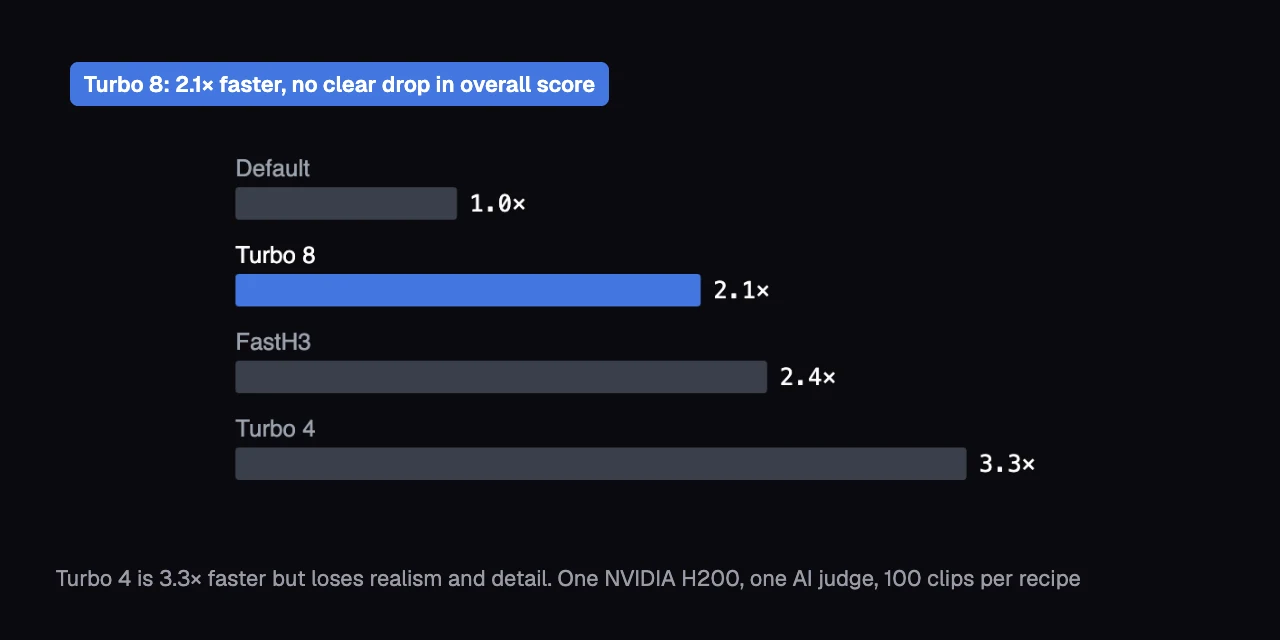
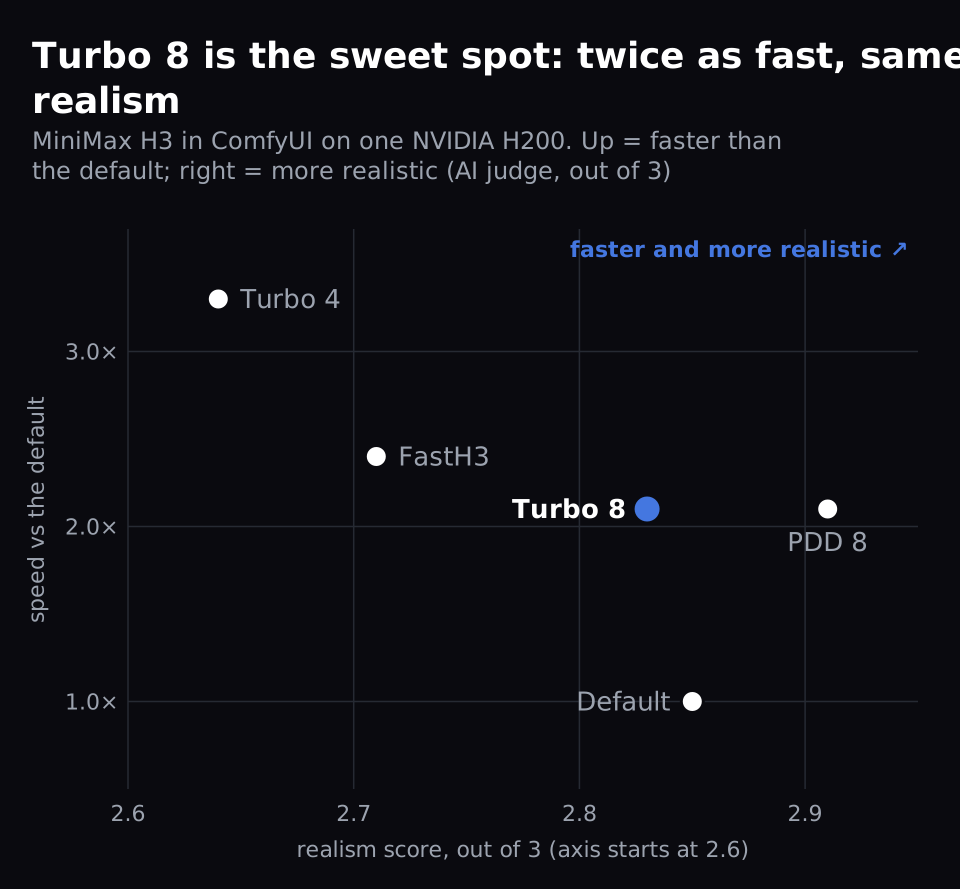
Turbo in ComfyUI's template for MiniMax H3, MiniMax's open video-with-sound model, renders each 5-second clip 2.1× faster on one NVIDIA H200. Our AI judge, a vision model that scores the frames (not the sound) blind to their setting, found no clear drop in its overall score. Turbo 4, which runs 4 steps (passes that remove noise) instead of 8, is 3.3× faster but clearly loses realism and detail.
That's 43.6 seconds a clip down to 20.5. Turbo is a LoRA, a small add-on file that adjusts the model, so it can finish in 8 steps instead of 20.
What did we find?
| Recipe | Seconds per clip | Speed | Verdict |
|---|---|---|---|
| Default (20 steps) | 43.6 | 1.0× | the reference |
| Turbo 8 (the template's switch) | 20.5 | 2.1× | finals: usable clips held, 89.0% against 87.9% |
| Turbo 4 (the same LoRA at 4 steps) | 13.0 | 3.3× | drafts: it loses realism and fine detail |
| FastH3 (a separate sped-up model) | 17.9 | 2.4× | skip: Turbo 8 is nearly as fast and keeps realism and detail |
| PDD 8 (another speed LoRA) | 20.7 | 2.1× | an alternative to Turbo 8, but not in the template |
- Turbo doesn't kill motion on H3: recipe clips moved 26-40% more than the default's.
- Our AI judge scored frames only: H3 also makes sound, and we didn't measure it.
- On Jarvislabs, download the Turbo LoRA first (1.96 GB): it isn't in our model store.
What did we run?
The same 100 prompt-and-seed pairs with the template default and four speed recipes, on one NVIDIA H200.
- Model: MiniMax H3 text-to-video, with the int8 model file the template loads (
minimax_h3_fl2va_pruned_int8_convrot). int8 stores each of the model's numbers in 8 bits to save memory. - Default: the template's settings with Turbo off: 20 steps.
- Turbo 8: the template's Turbo switch. It loads lightx2v's Turbo LoRA,
minimax_h3_fl2v_turbo_8step_v1.0_comfyui_bf16, and runs 8 steps. - Turbo 4: the same 8-step LoRA with turbo_steps set to 4. The template's notes also link a separate 4-step Turbo LoRA; we didn't test it.
- PDD 8: another 8-step speed LoRA, Kijai's "PDD Acc", in place of Turbo's. It isn't in the template. It runs with its documented settings (euler sampler, shift 12/3), not the template's res_multistep, so it isn't a pure LoRA swap. A sampler is the rule each step uses to remove noise; shift sets how the noise removed is spread across the steps.
- FastH3: FastVideo's 8-step version of H3. Attention is the part of the model that relates each patch of the video to the others. FastH3 uses sparse attention: it computes only 10% of it. It has its own template.
- Clips: 864×480, 124 frames (about 5 seconds at 24 frames a second), 20 prompts × 5 seeds for each setting: 100 clips each. A seed is the number that fixes the random starting noise. One default clip couldn't be judged, so judged comparisons use 99 pairs.
- Where: one NVIDIA H200, ComfyUI v0.37.0 as shipped on Jarvislabs.
How much faster is each MiniMax H3 speed recipe?
Every MiniMax H3 speed recipe is at least twice as fast as the default. Turbo 4 is the fastest at 13.0 seconds a clip, 3.3× the default's speed.
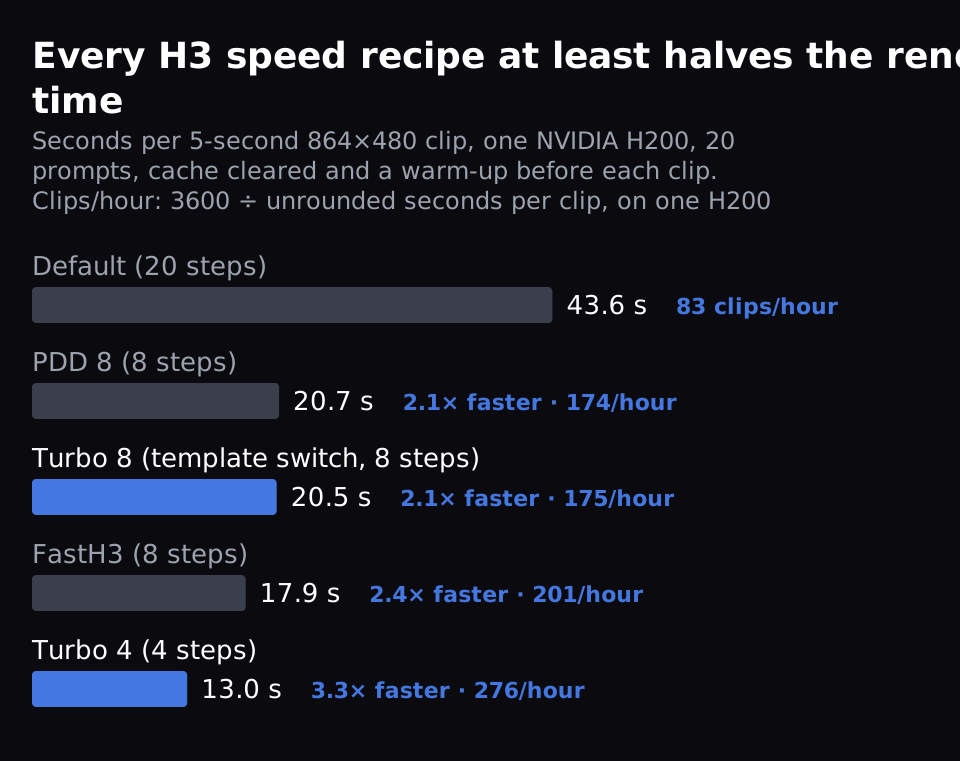
Turbo 8 and PDD 8 both take about 20.5 seconds, 2.1× faster. Dropping Turbo from 8 steps to 4 makes it 1.6× faster again, not 2×. FastH3 takes 17.9 seconds, 2.4× faster. From the unrounded times, one H200 makes 82.6 clips an hour by default, 175.3 with Turbo 8 and 276.1 with Turbo 4.
We timed one seed of each of the 20 prompts. Before every clip we cleared ComfyUI's cache and ran a warm-up, so no stage was reused from an earlier run.
Does Turbo lower MiniMax H3's quality?
Not overall. With every MiniMax H3 speed recipe, 84-89% of clips were usable, against 87.9% by default. No recipe's overall score was clearly lower, including PDD 8's at 84%. But Turbo 4 and FastH3 clearly lost realism and fine detail; Turbo 8 and PDD 8 kept them.
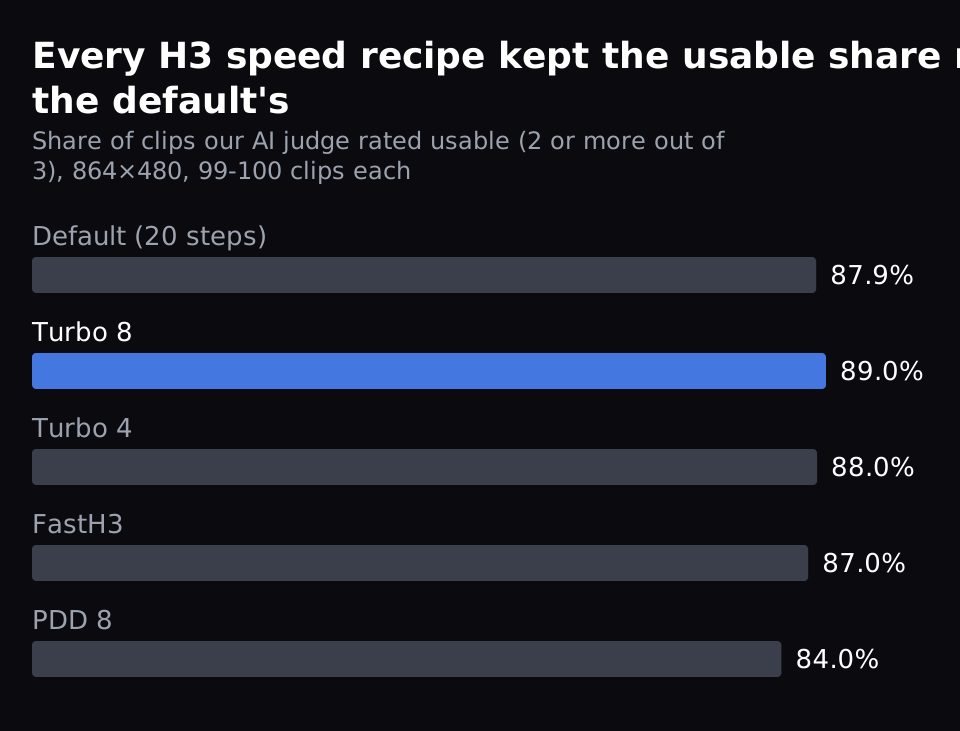
Our AI judge is a vision model, GLM-5.3-Flash, that looked at 24 frames of each clip, not its sound, without knowing its setting. It scored each clip from 0 to 3 on our study's rubric. A 3 means usable as generated, 2 usable with a small visible flaw, 0 that the main request fails. We count a clip as usable at 2 or more.
The judge also scored realism and fine detail on their own, each from 0 to 3, where 3 means no visible flaws.
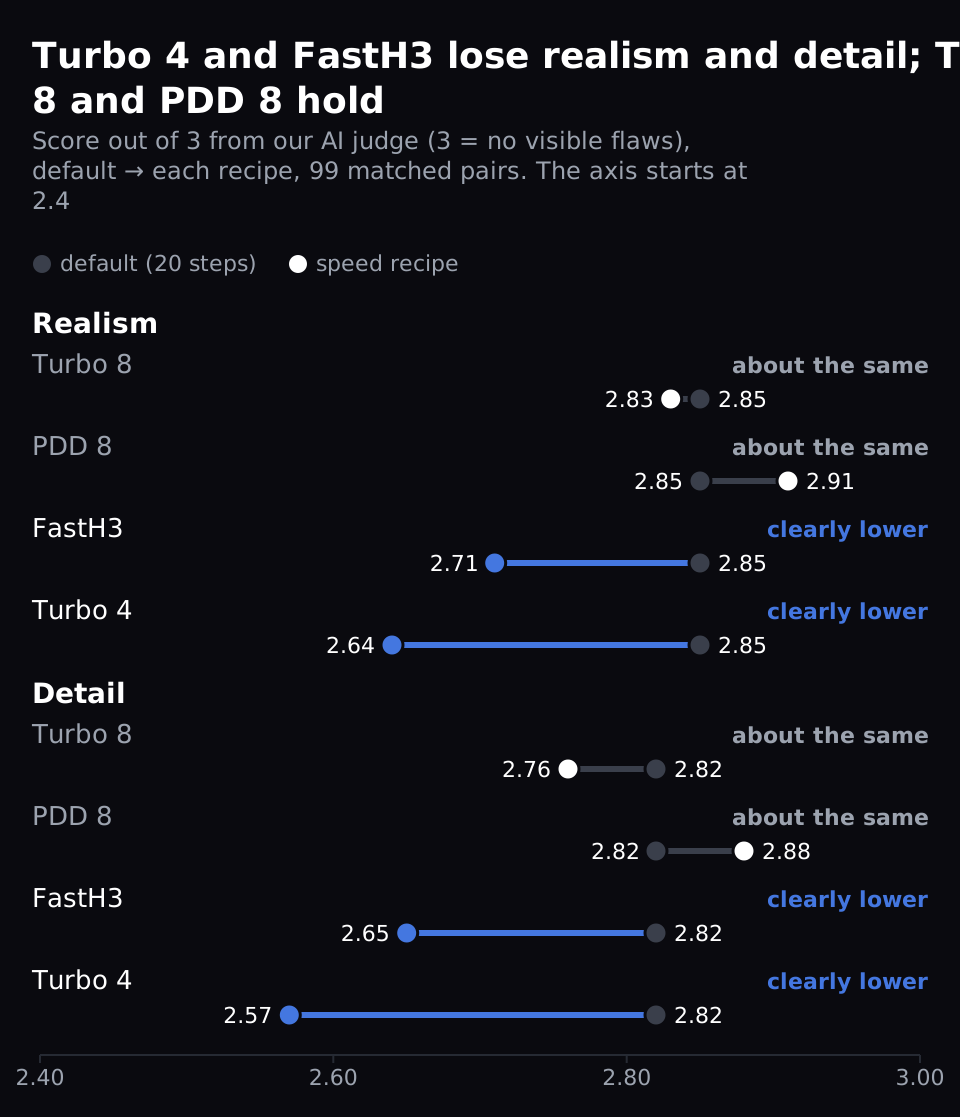
- Turbo 4: out of 3, realism fell from 2.85 to 2.64 and detail from 2.82 to 2.57. Consistency over time, whether things stay stable from frame to frame, fell a little too. So did identity, whether the subject keeps looking like itself. Both drops are small but clear.
- FastH3: realism fell to 2.71 and detail to 2.65. Consistency over time and identity also fell, slightly but clearly, as with Turbo 4. So did persistent elements, whether the objects and background the prompt lists stay the same: 2.63 to 2.43.
- Turbo 8: only the subject's identity dipped, from 2.90 to 2.82: small, but clearly below the default.
- PDD 8: no score clearly changed.
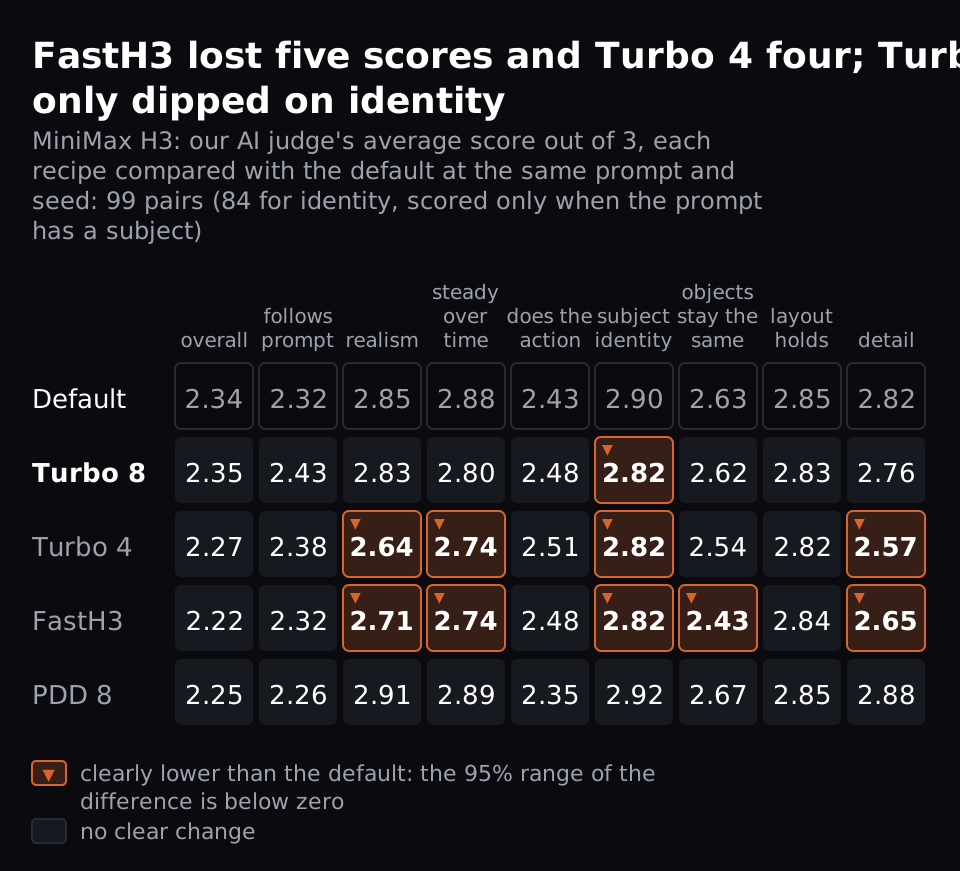
For experts: each score compares a recipe's clip with the default's at the same prompt and seed, 99 pairs. Identity has 84, because it's scored only when the prompt has a subject. "Clearly" means the 95% interval of the difference, the range the true difference likely sits in, doesn't include zero. We computed it by resampling the 20 prompts (a bootstrap), so the 5 seeds of one prompt count together. We used one judge.
We checked the judge on 60 clips from our Wan 2.2 study, against that study's own AI judge, not people. It scored within one point of that judge on 95-100% of clips for every score. Detail was its weakest match, with the exact same score on 67% of clips. We haven't checked it on H3 clips.
Does Turbo give you the same clip, only faster?
Not exactly. Pixel by pixel, every recipe changed the clip less than a new seed did. That suggests it stays closer to your default shot, though pixel differences alone don't prove the composition is the same.
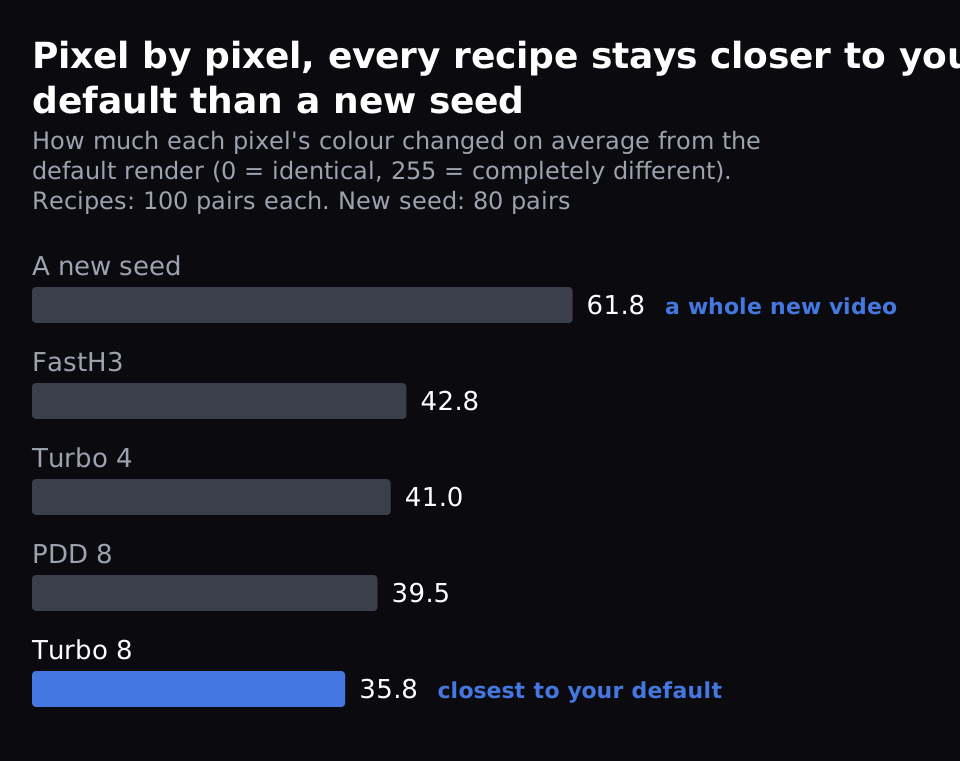
We measured how much each pixel's colour changed on average between two renders, on a 0-255 scale: 0 means identical, 255 completely different. Turbo 8 changed the clip by 35.8 and FastH3 by 42.8. A new seed, a whole new video, changed it by 61.8 (80 pairs). So Turbo 8 changes your clip a little over half as much as a new seed does.
This is different from Wan 2.2's Lightning LoRA, which changed the clip more than a new seed did in our tests. On H3, Turbo 8 changes the clip least of the four recipes.
Does Turbo kill motion on H3?
No. Every H3 recipe's clip had more motion than the default's in 73-87% of the 100 pairs.
We measured motion with optical flow: how many pixels each part of the frame moves between frames. The typical recipe clip moved 26-40% more than its default (for experts: median ratio 1.26 to 1.40 over 100 pairs). The judge didn't score the extra motion worse. Its score for doing the requested action, out of 3, stayed between 2.35 and 2.51 for the recipes, against 2.43 for the default.
Why does Turbo 4 lose realism and detail?
Our reading, not tested directly: 8 steps still leave room to finish fine detail; at 4 steps the model has to skip some of it. The LoRA we ran was made for 8 steps, so the separate 4-step LoRA may lose less; we didn't test it. FastH3 computes only 10% of the attention, which may cost detail the same way.
How do I turn Turbo on?
In ComfyUI's MiniMax H3 text-to-video template (templates 0.11.66, ComfyUI v0.37.0):
- On Jarvislabs, download the Turbo LoRA first (1.96 GB, linked in the template's "Model Links" note) into
ComfyUI/models/loras. It isn't in our model store, and in our tests the template wouldn't run without it, even with Turbo off. - On the template's main node, switch turbo_mode on. It runs 8 steps (turbo_steps).
- Set turbo_steps to 4 only for drafts. Switch turbo_mode off to go back to the default.
FAQ
Is the MiniMax H3 Turbo LoRA worth using?
Yes, at 8 steps. The MiniMax H3 Turbo LoRA renders a clip in ComfyUI 2.1× faster, 43.6 to 20.5 seconds. Our AI judge found no clear drop in the overall score; only the subject's identity score dipped slightly (2.90 to 2.82). At 4 steps it's 3.3× faster but clearly loses realism and detail.
Should I use Turbo 4 for final renders?
Use it to explore. It's 3.3× faster and its overall score barely moved, but realism and detail clearly dropped. Render the final with Turbo 8; we didn't test whether it keeps a Turbo 4 draft's shot at the same seed.
Is FastH3 better than Turbo 8?
It's faster, 17.9 against 20.5 seconds, but it clearly lost five of our judge's nine scores, realism and detail among them. Turbo 8 lost only identity. Its model is also a separate 22.1 GB download.
Does Turbo change the sound?
H3 makes sound with every clip, but we didn't measure it. Our judge scored the frames only.
Does this hold for image-to-video?
We tested text-to-video only, at 864×480. We haven't measured Turbo on H3's image-to-video.
Get Started
Build & Deploy Your AI in Minutes
Cloud GPU infrastructure designed specifically for AI development. Start training and deploying models today.
View Pricing