Wan 2.2 Lightning in ComfyUI: 85% faster, but a different video

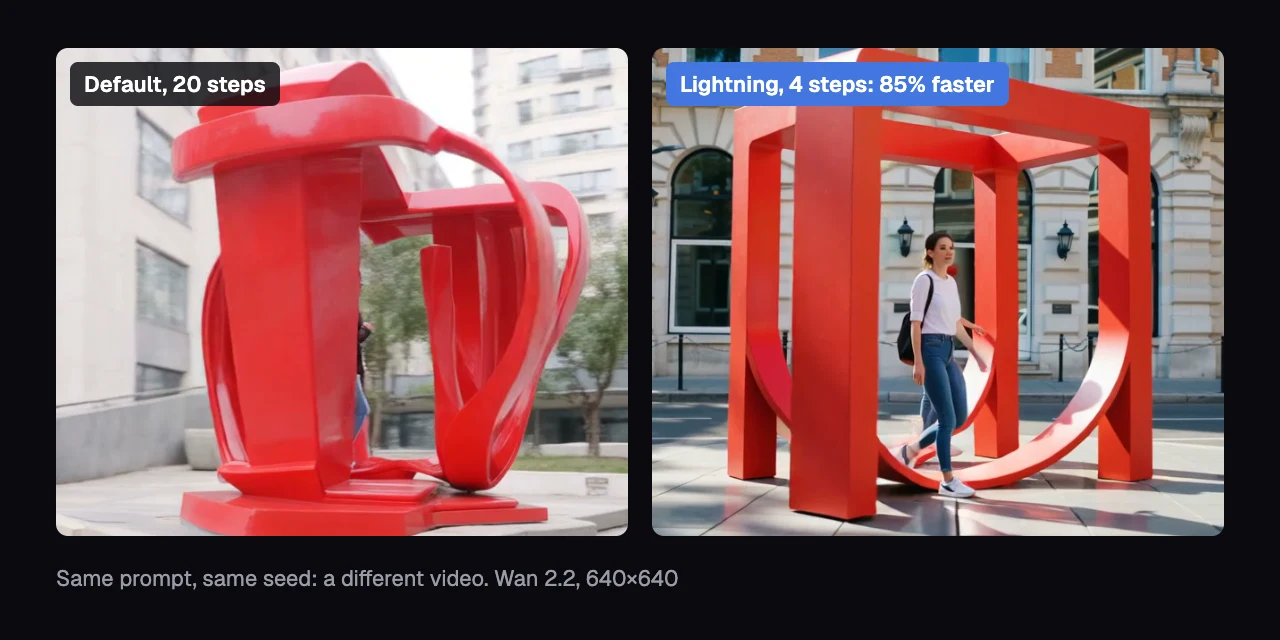
Lightning, the turbo switch in ComfyUI's Wan 2.2 text-to-video template, renders each clip 85% faster. In our copy of the template's graph on one NVIDIA H200, a 5-second 640×640 clip went from 151.8 to 22.4 seconds. But the same prompt and seed give you a different video, not a faster copy of the one you had.
Lightning is a pair of LoRAs, small add-on files that adjust a model, made by lightx2v for Wan 2.2. A seed is the number that fixes the random starting noise, so normally the same prompt and seed give the same video. Two AI judges, vision models that scored each clip blind to its setting, found no clear drop in any score on 100 matched pairs. And the common worry that Lightning turns everything into slow motion is only half right.
What did we find?
- 85% faster: 151.8 to 22.4 seconds per 5-second 640×640 clip on one NVIDIA H200.
- A different video: the same prompt and seed don't give you the same shot. Lightning changes the clip about a third more than picking a new seed does.
- No quality drop we could detect: two AI judges rated about 3 in 4 Lightning clips usable, against about 7 in 10 default clips. No score was clearly lower.
- Motion is squeezed into a band: average motion halves, but busy scenes get calmer and calm scenes livelier. A dog walking to a ball moves about 7 times less; a woman stepping toward a painting about 5 times more.
What did we run?
- Model: Wan 2.2 T2V A14B, the text-to-video model ComfyUI's template uses, with its fp8 weights. fp8 stores each of the model's numbers in 8 bits to save memory.
- Default: 20 steps at cfg 3.5. A step is one pass that removes some noise from the video; cfg is how strongly each step is pushed toward your prompt.
- Lightning: the lightx2v 4-step LoRAs v1.1 at strength 1, 4 steps at cfg 1.0. This is what the template's turbo switch loads.
- Clips: 81 frames (5 seconds at 16 frames a second), 640×640, 20 prompts × 5 seeds for each setting: 100 matched pairs.
- Where: our study's copy of the template graph, on NVIDIA H200s, ComfyUI v0.37.0. The default clips come from an earlier round of the same study, with the same prompts and seeds.
How much faster is Wan 2.2 Lightning?
Wan 2.2 Lightning cut each clip's render time in ComfyUI by 85% at 640×640, from 151.8 to 22.4 seconds. That's about 2 minutes back per clip, or almost 7 times as many clips per hour on one GPU.
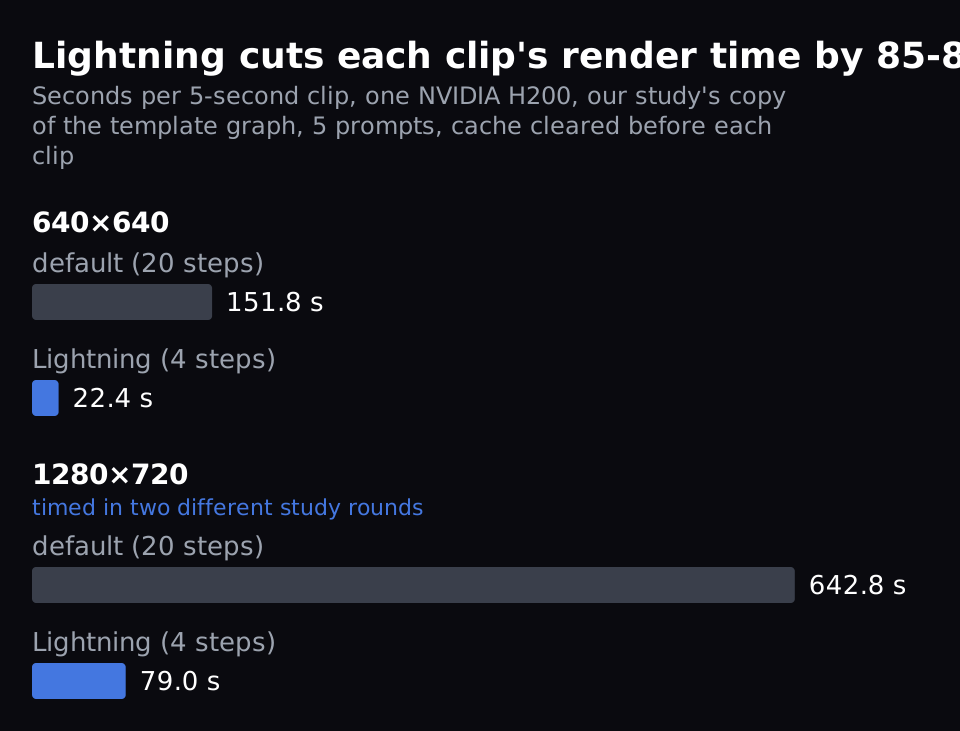
We timed 5 prompts with fresh runs in our study's copy of the template graph. It uses the same LoRAs, steps and cfg as the switch. We cleared ComfyUI's cache before each clip so no stage was reused.
At 1280×720, Lightning took 79.0 seconds against 642.8 for the default, about 88% faster. Those two 720p numbers come from different rounds of our study, on the same type of box, and we judged quality only at 640×640.
Does Wan 2.2 Lightning give the same video at the same seed?
No. With the same prompt and seed, Wan 2.2 Lightning's clip differs from the default's more than a new seed's clip does. That's 71.0 against 54.2 on a 0-255 scale.
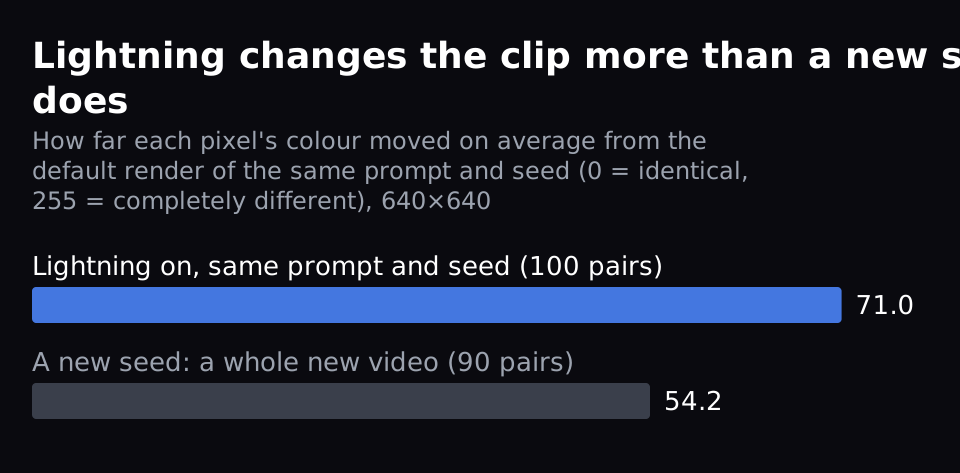
We measured how far each pixel's colour moved on average between two renders. Colour values run from 0 to 255, so 0 means identical and 255 completely different. Lightning at the same prompt and seed changed the clip by 71.0 (100 pairs). A new seed, a whole new video, changed it by 54.2 (90 pairs).
So, pixel by pixel, Lightning changes your clip about a third more than picking a new seed does.
Left: the default. Right: Lightning. Same prompt ("A woman stands in front of a large blue painting. She steps closer to the painting. The painting remains blue and rectangular."), same seed (1003), 640×640.
If you find a shot you like with Lightning on, that is the shot. Turning Lightning off at the same seed gives you a different one.
Is Wan 2.2 Lightning worse quality than the default?
Not measurably. Our two AI judges rated about 3 in 4 Wan 2.2 Lightning clips usable, against about 7 in 10 default clips. No score they gave was clearly lower with Lightning.
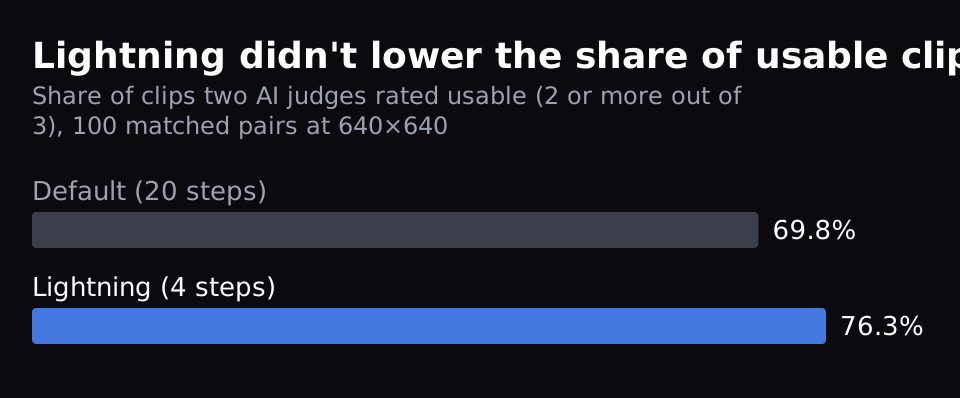
The judges, GLM-5.3-Flash and Qwen3.8-Flash-Next, are vision models that watched each clip's frames without knowing its setting. Each scored the clip from 0 to 3. A 3 means usable as generated, 2 usable with a small visible flaw, 0 that the main request fails. We count a clip as usable at 2 or more.
We kept a score only when the two judges were within one point of each other.
For experts, the average scores out of 3 (86 to 99 matched pairs per score):
| score | default | Lightning |
|---|---|---|
| overall | 2.01 | 2.16 |
| follows the prompt | 2.13 | 2.26 |
| realism | 2.52 | 2.49 |
| motion over time | 2.51 | 2.67 |
| requested motion | 2.20 | 2.37 |
We computed a 95% interval for each difference, the range the true difference likely sits in. Only motion over time is clearly above zero (+0.167, interval 0.025 to 0.308); the others include zero. We left out the detail score: the two judges' agreement on it was too weak to trust once you allow for agreement by chance.
Does Lightning make Wan 2.2 slow-motion?
Partly. Wan 2.2 Lightning halves the average motion, but it doesn't calm every clip: half of Lightning's clips move more than their default. What it does is squeeze every prompt's motion into a narrow band.
We measured motion with optical flow: how many pixels each part of the frame moves between frames. We shrank frames to 320 pixels wide first.
Averaged over 100 clips, Lightning's clips moved about half as much as the default's: 0.437 against 0.880 pixels per frame. Two prompts, the dog and a camera orbit, drive most of that drop. Compare each Lightning clip with its own default instead and 50 of 100 move more, 50 less. Only 14 of 100 come within 25% of their default's motion, up or down.
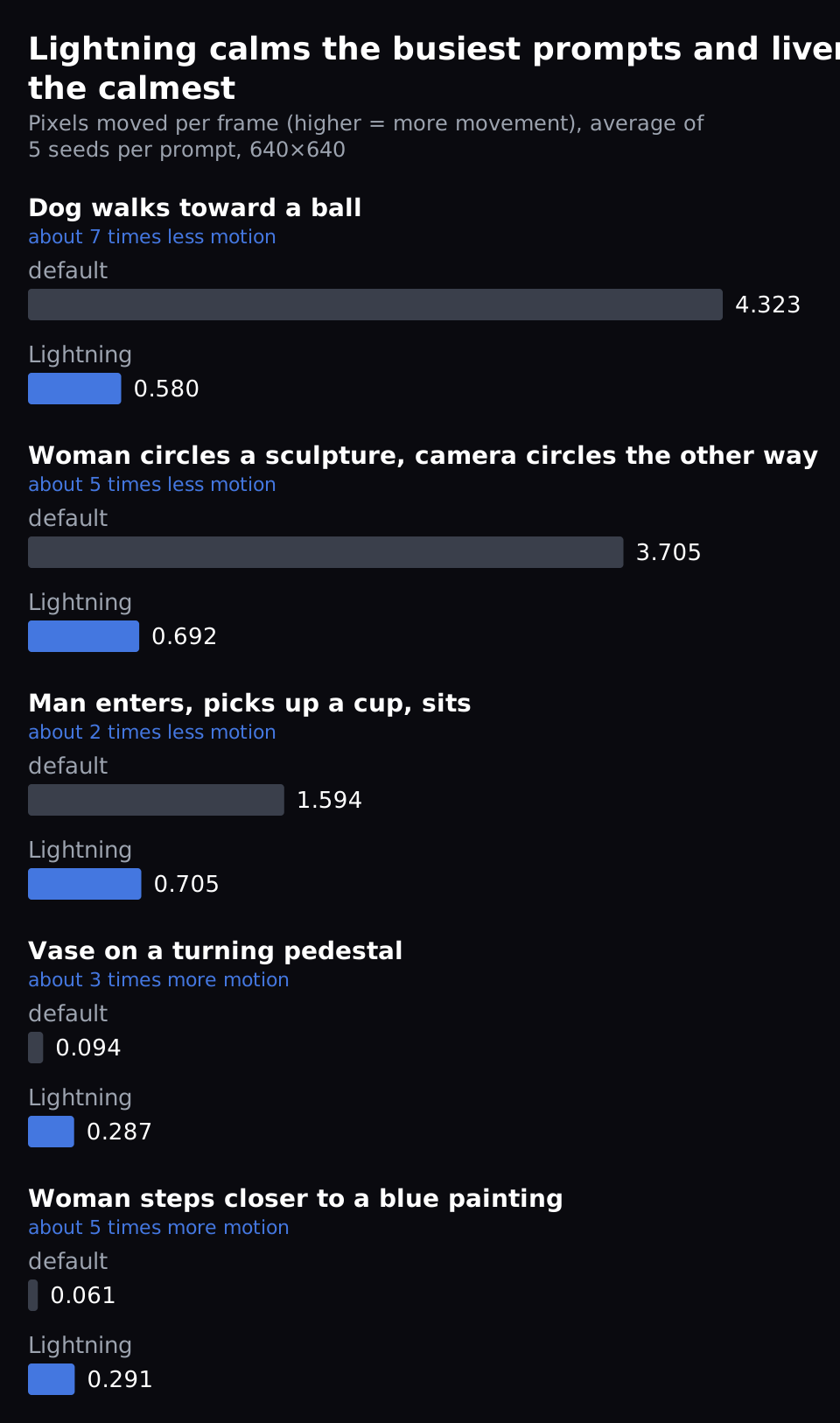
- Busy prompts get calmer. A dog walking toward a ball moved about 7 times less (4.32 to 0.58 pixels per frame). Ranked by default motion, the 9 busiest prompts all moved less.
- Calm prompts get livelier. A woman stepping closer to a painting moved about 5 times more (0.061 to 0.291). The other 10 calmest all moved more.
- The range shrinks. Across 20 prompts, the default's motion spans 70 times from calmest to busiest; Lightning's spans 8 times.
Could the busiest prompts just be the ones that happened to come out busy on these seeds? We checked: we ranked prompts by motion on two seeds, then measured on the other three. Lightning was lower in 9 of the 10 busiest prompts and higher in all 10 calmest.
Part of what disappears may be motion you didn't want. A hard cut is a sudden jump to a different shot inside one clip. Our automatic cut detector flagged a cut in 13 of 100 default clips and in 1 of 100 Lightning clips. We didn't check these flags by eye; where we did in our study, about 7 in 10 were real cuts.
So if your prompt asks for a big move, like a camera circling a subject, expect less of it with Lightning. Our judges' requested-motion score didn't drop (2.20 to 2.37), but it checks that the action happens, not how big it is. If your shots come out too static, Lightning may add life.
Why does Lightning behave this way?
By default each of the 20 steps runs the model twice. One run uses your prompt, the other the negative prompt, the text the model is pushed away from.
cfg sets how hard each step is pushed toward your prompt and away from the negative one. At cfg 1.0 ComfyUI skips the negative-prompt run (comfy/samplers.py), so Lightning runs the model 4 times instead of 40. We used the same effect on one sampler in our earlier post on a faster Wan 2.2 setting.
The motion pattern is our reading, not something we tested directly. Four steps leave little room to build a large move. And a few-step LoRA is trained to copy the full model's typical output, so it pulls toward a typical amount of motion.
How do I turn Lightning on?
In ComfyUI v0.37.0 on Jarvislabs:
- Open Templates in the left sidebar and pick "Wan 2.2 14B Text to Video".
- On its main node, the one with the width and height, switch enable_turbo_mode on. It loads the two Lightning LoRAs (v1.1, strength 1) and sets 4 steps and cfg 1.0.
- Switch it off to go back to 20 steps.
The LoRA files are linked in the template's "Model Links" note; they come from Comfy-Org's Wan 2.2 repackaged files on Hugging Face.
FAQ
Can I use Lightning to preview a shot, then render it without Lightning?
Not at the same seed. Use Lightning to explore prompts, then re-render with the setting you'll deliver with and pick again.
Does Lightning help on GPUs smaller than an H200?
We timed only the H200. Lightning runs the model 4 times instead of 40. So we expect a large saving on any GPU that fits the model, but we haven't timed one. If ComfyUI has to offload, moving parts of the model to system memory while it runs, we don't know.
Does this hold for image-to-video or 720p?
We measured motion and quality on text-to-video at 640×640 only. At 1280×720 we timed it: 79.0 seconds with Lightning against 642.8 for the default, from two different rounds of our study. We haven't tested image-to-video.
Did you test newer Lightning releases?
No. We tested v1.1, the version ComfyUI's template loads. Later Lightning releases may move differently; we haven't measured them.
Get Started
Build & Deploy Your AI in Minutes
Cloud GPU infrastructure designed specifically for AI development. Start training and deploying models today.
View PricingContinue Reading
Which Wan 2.2 model file should you download? Keep the template's fp8
9 min read
Make Wan 2.2 render about 24% faster in ComfyUI: one setting, near-identical video
10 min read
MiniMax H3 in ComfyUI: Turbo is 2.1× faster at 8 steps; at 4 it costs realism and detail
9 min read