Which Wan 2.2 model file should you download? Keep the template's fp8

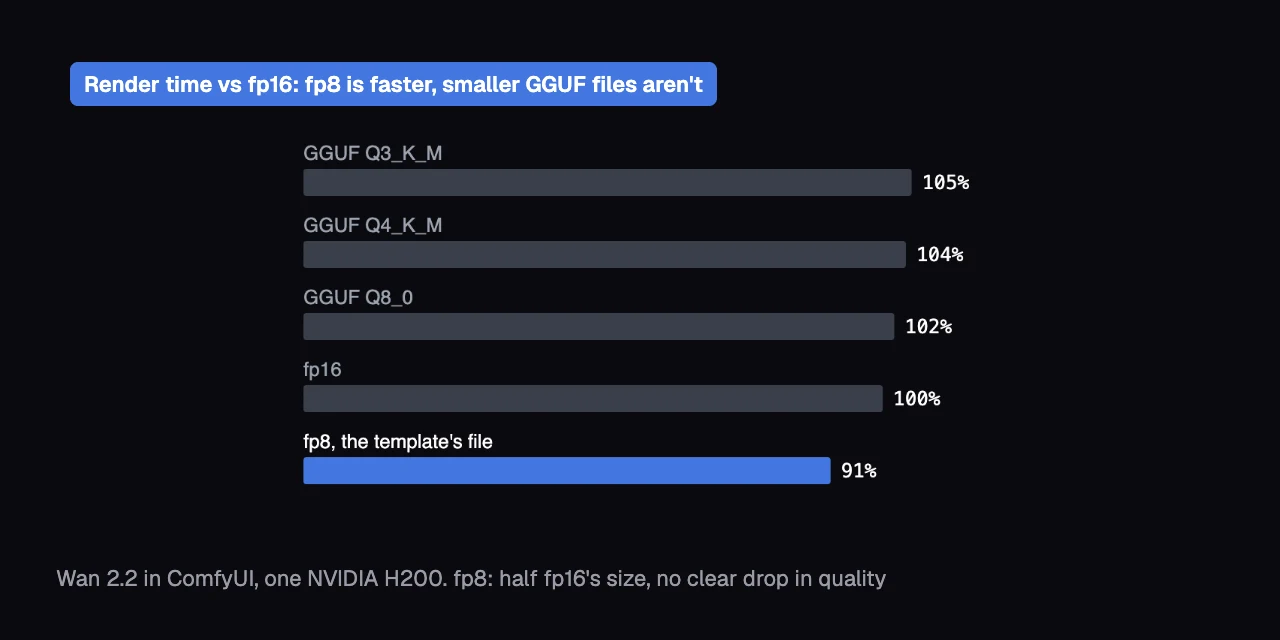
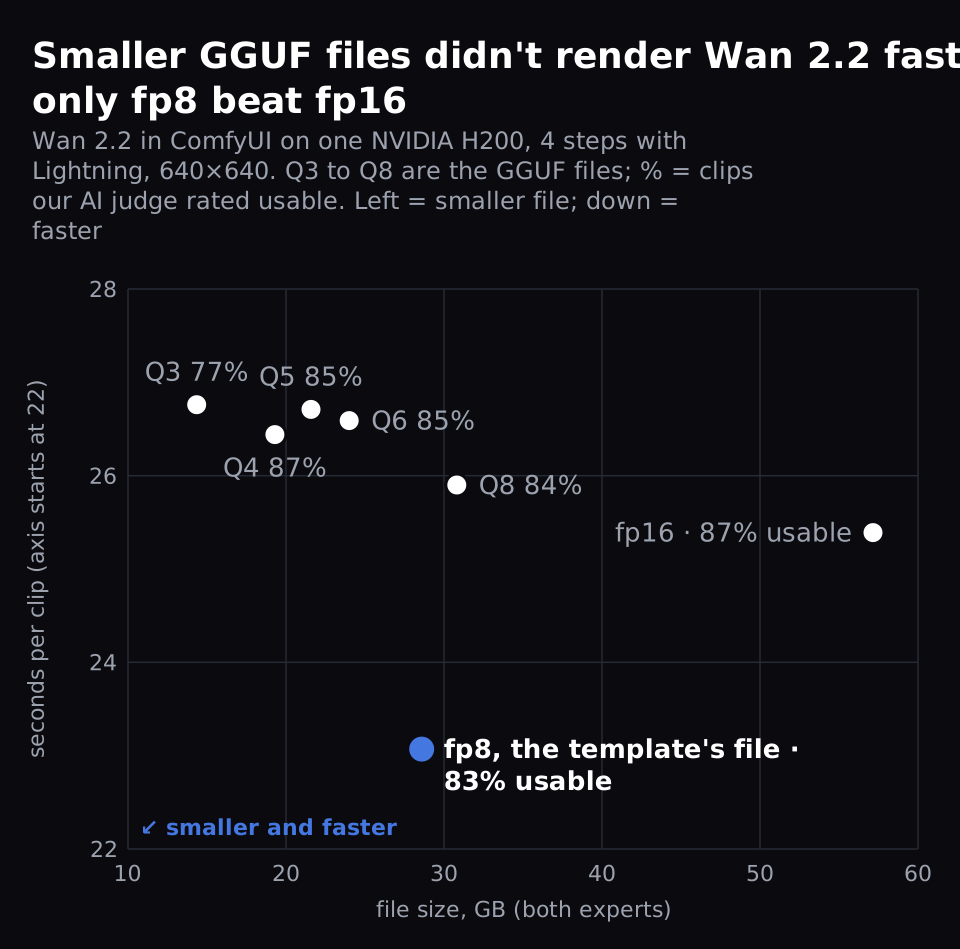
Keep the fp8 file that ComfyUI's Wan 2.2 template already loads; it stores each of the model's numbers in 8 bits. It's half the size of the full fp16 file (16 bits) and 9% faster on an NVIDIA H200, in our 4-step runs at 640×640. Our AI judge, a vision model that scores clips blind, found no clear difference between the two.
GGUF is another file format, with levels from Q8 down to Q3. The lower the number, the fewer bits per number and the smaller the file. Smaller GGUF files save disk space but ran 2-5% slower than fp16, and only Q3 clearly lost quality.
What did we find?
- Keep the template's fp8 file: half fp16's size, 9% faster with Lightning on, and no score clearly lower than fp16's.
- Smaller GGUF files don't render faster: every level from Q8 to Q3 ran 2-5% slower than fp16 on an H200.
- GGUF Q8 stays closest to fp16's pixels, but doesn't look better: our AI judge couldn't tell fp16, fp8 and Q8 apart.
- Q4_K_M is the smallest file that held up (19.30 GB): Q3 dropped to 77% usable clips, against 87% for fp16.
- MiniMax H3, same story: every file scored like the full 16-bit file (bf16), and the template's default file is a third of its size.
What did we run?
Seven Wan 2.2 files, the same 100 prompt-and-seed pairs each, on one NVIDIA H200.
- Model: Wan 2.2 T2V A14B, text-to-video. It has two experts, one model for the early, noisy steps and one for the late steps, so every file comes as a pair. A step is one pass that removes some noise from the video.
- Files: fp16, our reference, at 57.15 GB for both experts; the template's fp8 at 28.59 GB. Then QuantStack's GGUF Q8_0, Q6_K, Q5_K_M, Q4_K_M and Q3_K_M, from 30.81 down to 14.35 GB.
- Settings: our study's Lightning workflow: the lightx2v Lightning LoRAs, which let Wan finish in 4 steps instead of the default 20, and cfg 1. A LoRA is a small add-on file that adjusts a model; cfg is how strongly each step is pushed toward your prompt. 640×640, 81 frames (5 seconds).
- Clips: 20 prompts × 5 seeds per file. A seed is the number that fixes the random starting noise.
- Where: ComfyUI v0.37.0 as shipped on Jarvislabs. We also tested MiniMax H3's files the same way (see below).
Do smaller GGUF files render faster?
No. Every Wan 2.2 GGUF file was 2-5% slower than fp16 in ComfyUI on an H200. Only fp8 was faster.
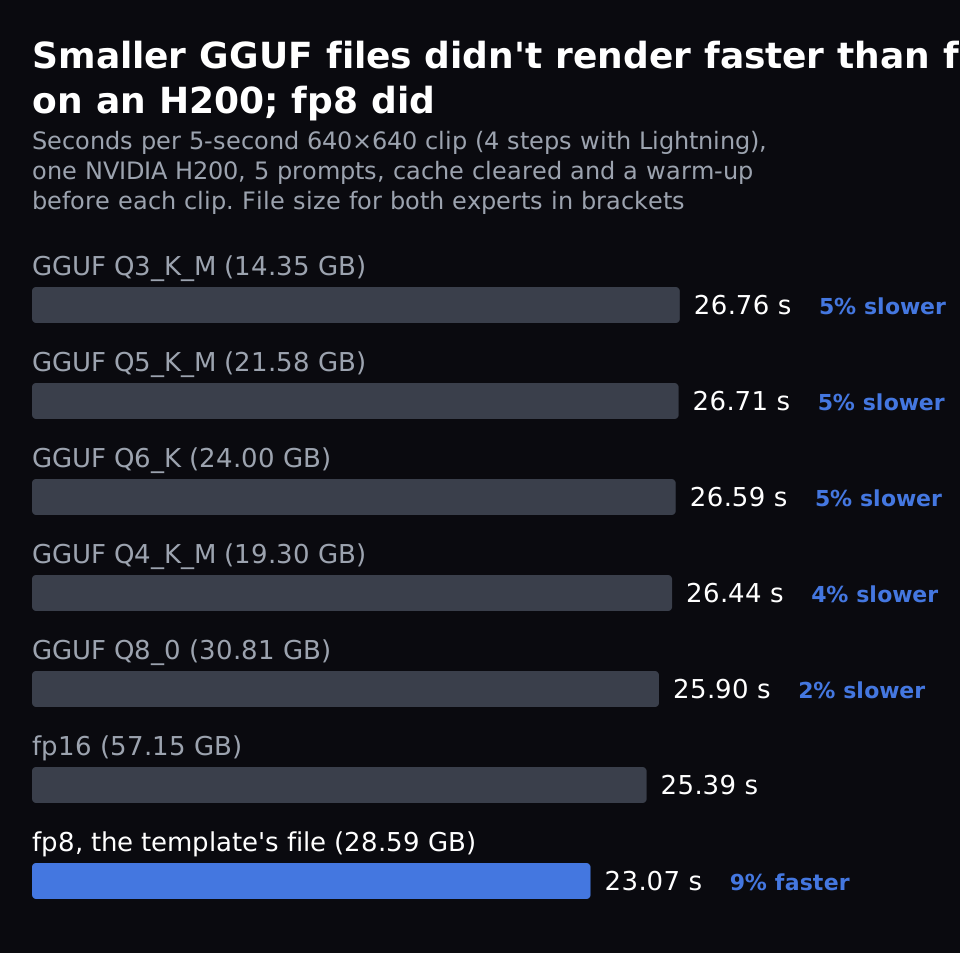
fp16 took 25.39 seconds a clip. The GGUF files took 25.90 to 26.76 seconds: Q8 2% slower, the rest 4-5% slower. fp8 took 23.07 seconds, 9% faster.
We timed 5 clips per file, one seed each, so gaps of a few percent are approximate. We ran them with ComfyUI's cache cleared and a warm-up before each clip.
On an H200, which fits every file, a smaller file saves disk space and download time, not render time.
Does a smaller file change your video?
A little, and less than a new seed. GGUF Q8 changes the clip least, 2.5× less than fp8.
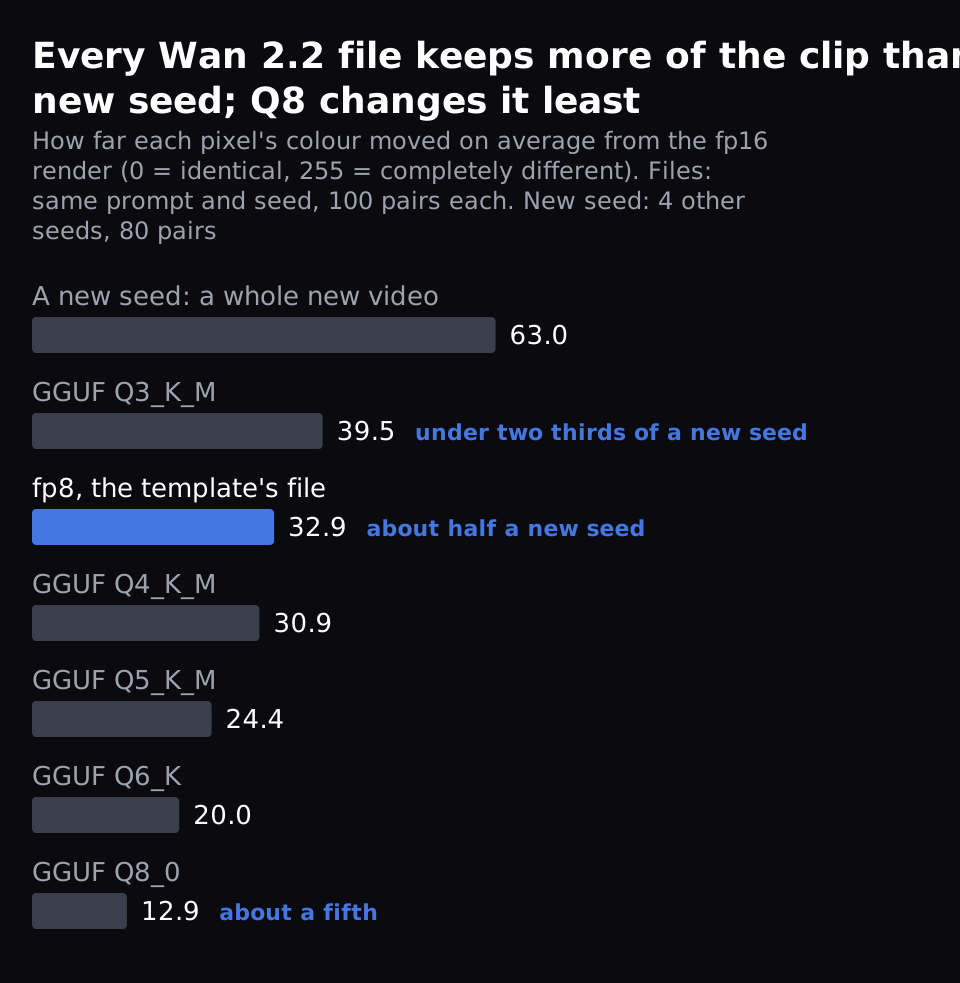
We measured how far each pixel's colour moved on average between two renders, on a 0-255 scale: 0 means identical, 255 completely different. At the same prompt and seed (100 pairs per file), Q8 changed the fp16 clip by 12.9 and fp8 by 32.9. Yet the two files are almost the same size, 30.81 and 28.59 GB.
Each GGUF step down changed it more, up to 39.5 for Q3. A new seed, a whole new video, changed it by 63.0 (80 pairs). So Q8 changes your clip about a fifth as much as a new seed, fp8 about half, and even Q3 under two thirds.
Does fp16 look better than fp8 or GGUF for Wan 2.2?
Not to our judge. With fp16, fp8 and every GGUF file down to Q4, 83-87% of clips were usable. Only Q3 dropped, to 77%, and it's the one file with a score clearly lower than fp16's.
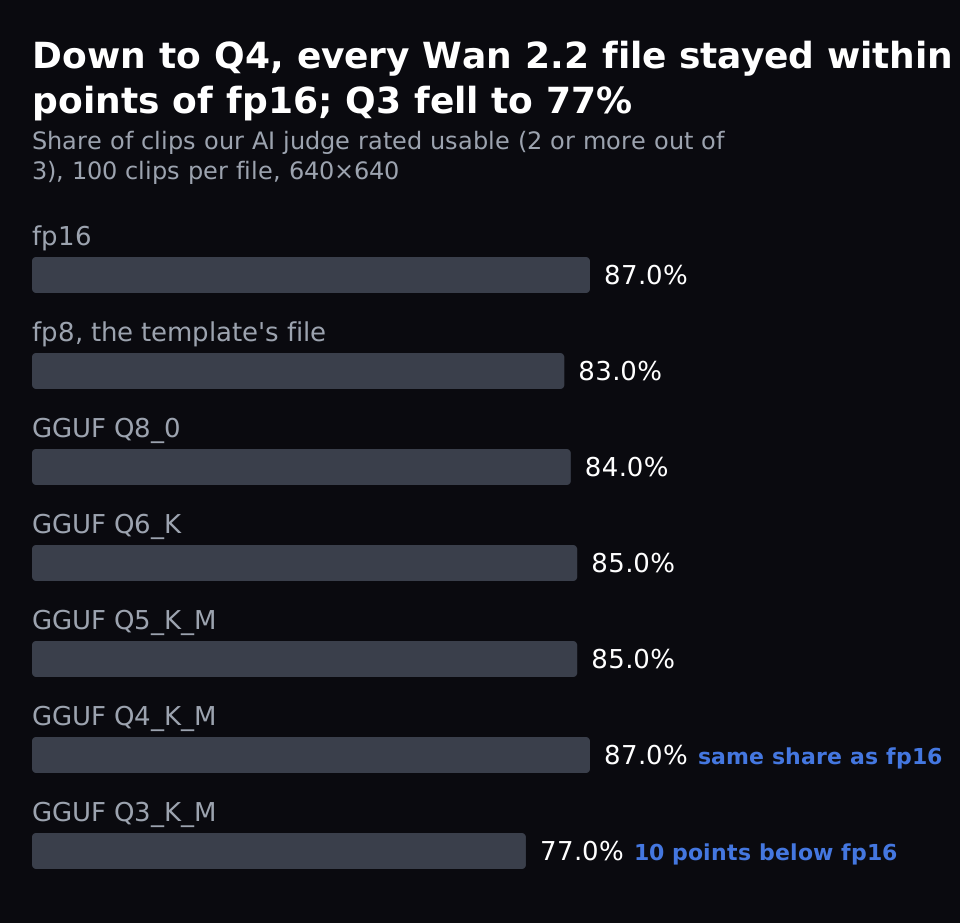
Our AI judge is a vision model, GLM-5.3-Flash. It looked at 24 frames of each clip without knowing which file made it. It scored each clip from 0 to 3 on our study's rubric. A 3 means usable as generated, 2 usable with a visible defect, 1 needs major repair and 0 means the main request fails.
We count a clip as usable at 2 or more. Q3 scored clearly lower on two things. One was the requested action, whether the movement you asked for actually happens: 2.50 to 2.30 out of 3. The other was composition, whether the scene's layout holds together: 2.79 to 2.71.
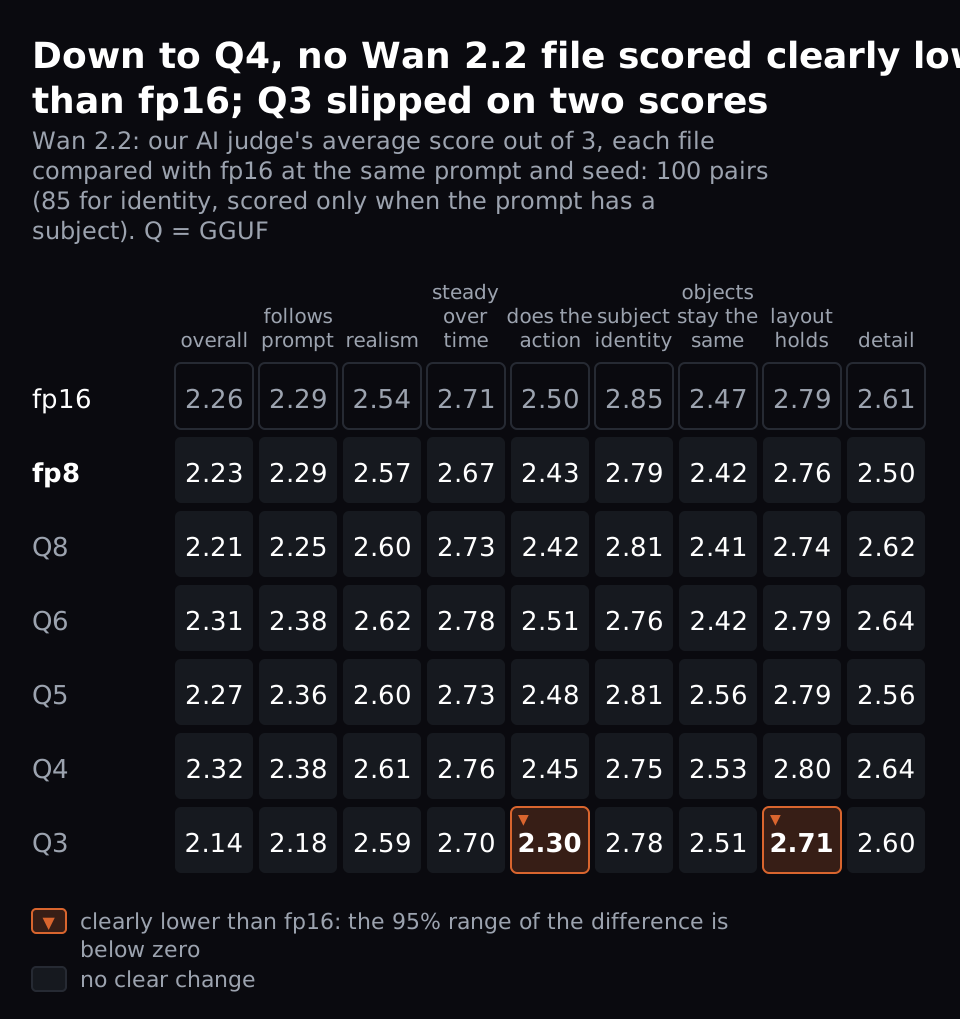
For experts: each score compares a file's clip with fp16's at the same prompt and seed, 100 pairs. Identity has 85, because it's scored only when the prompt has a subject. "Clearly" means the 95% interval of the difference, the range the true difference likely sits in, doesn't include zero. Q3's overall score fell by 0.12 (interval -0.25 to +0.01), just short of that. So did fp8's detail score, down 0.11 (interval -0.21 to +0.00).
We used one judge. We checked it on 60 clips from our earlier Wan 2.2 study, against the same model's scores in that study, not people. It scored within one point of those scores on 95-100% of clips for every score (kappa 0.41 to 0.93).
Our Lightning post measured the same fp8 setting at 22.4 seconds and 76.3% usable. That was a separate run, scored by two judges, so its numbers differ a little from these.
What about MiniMax H3?
The same holds for MiniMax H3, MiniMax's open model for video with sound. Every H3 file scored like the full bf16 file; bf16 is another 16-bit format. The template's default, an int8 file (8 bits per number, like fp8), is a third of full bf16's size. Pruned files drop parts of the model its makers found it could do without.
| H3 file | GB | seconds per clip | usable |
|---|---|---|---|
| full bf16 | 66.28 | 45.57 | 88.0% |
| pruned bf16 | 40.23 | 45.58 | 87.0% |
| pruned int8_convrot (template default) | 20.97 | 43.58 | 87.9% |
| pruned fp8_scaled | 20.96 | 39.60 | 87.0% |
| pruned w4a8 (Kijai) | 12.54 | 45.06 | 85.0% |
We ran H3 at its template's default settings, 20 steps at 864×480 and 124 frames, for 100 clips per file (99 judged for int8). We timed 5 clips per file (20 for int8). Our judge scored the frames only, not H3's sound.
fp8 is the fastest, 9% faster than the default int8 at the same size. int8's clips and time come from our earlier H3 speed test, run on a second H200, so treat that gap as approximate. We checked the judge on Wan clips only, not on H3.
Why aren't smaller GGUF files faster?
Our reading, not something we tested directly: at 640×640 the GPU's time goes to computing, not to reading the model's numbers. So a smaller file doesn't help by itself. GGUF files are unpacked on the fly, which adds a little time. fp8 can run on the H200's fast 8-bit path.
Which Wan 2.2 file should I download?
Keep the Wan 2.2 template's fp8 files rather than GGUF: wan2.2_t2v_high_noise_14B_fp8_scaled.safetensors and wan2.2_t2v_low_noise_14B_fp8_scaled.safetensors. That's for the 4-step Lightning setup we tested.
Need a smaller download? QuantStack's Q4_K_M files (Wan2.2-T2V-A14B-GGUF on Hugging Face, 19.30 GB for both experts) scored like fp16. They ran 4% slower than fp16.
Download Wan2.2-T2V-A14B-HighNoise-Q4_K_M.gguf and Wan2.2-T2V-A14B-LowNoise-Q4_K_M.gguf into ComfyUI/models/diffusion_models; our model store doesn't have them. Open the template's main node to see the nodes inside it. Replace its two Load Diffusion Model nodes with Unet Loader (GGUF), which comes with the ComfyUI image on Jarvislabs.
Don't go down to Q3.
FAQ
Is GGUF Q8 better than fp8 for Wan 2.2?
Not in our tests. Wan 2.2 GGUF Q8 stays closer to fp16's pixels: 12.9 against 32.9 on a 0-255 scale. But our judge found no clear difference between fp16, fp8 and Q8. And fp8 ran 9% faster than fp16, while Q8 ran 2% slower.
Does this hold without Lightning, at the template's default 20 steps?
We don't know yet: every run here used Lightning at 4 steps. The 20-step default loads the same model files, but we haven't timed or judged it.
Will a GGUF file let Wan 2.2 fit a smaller GPU?
We ran on an H200, which fits every file, so we didn't test that. We didn't measure how much GPU memory each file needs, so the file sizes are the only memory numbers here.
What's the lowest GGUF level before Wan 2.2 loses quality?
In our test, Wan 2.2 GGUF Q4_K_M (19.30 GB for both experts) still scored like fp16. Q3_K_M clearly dropped on two scores, the requested action (2.50 to 2.30) and composition (2.79 to 2.71). 77.0% of its clips were usable against 87.0% for fp16.
Get Started
Build & Deploy Your AI in Minutes
Cloud GPU infrastructure designed specifically for AI development. Start training and deploying models today.
View Pricing